How I developed an Am29000 C compiler and web browser
by Oscar Toledo G. Aug/16/2026
If you have read my previous article, you’ll know that I developed a windowed operating system in 32-bit machine code for a homebrew computer based on the Am29000 processor. In this article, I’ll talk about the development of my C compiler for these processors, and a web browser.
The time period was between Christmas 1998 and my birthday in 1999. I was age 20, Internet was spreading like fire in Mexico, Bruce Willis just saved the Earth from a giant asteroid, new careers emerged for the nascent Internet (it was a gold year for graphic designers), people was scared that the year 2000 bug would trigger a digital armageddon (even the Simpsons ran an episode where Homer forgets updating the computers), and Arnold Schwarzenegger was killing demons with bullets in End of Days.
Find me a C compiler
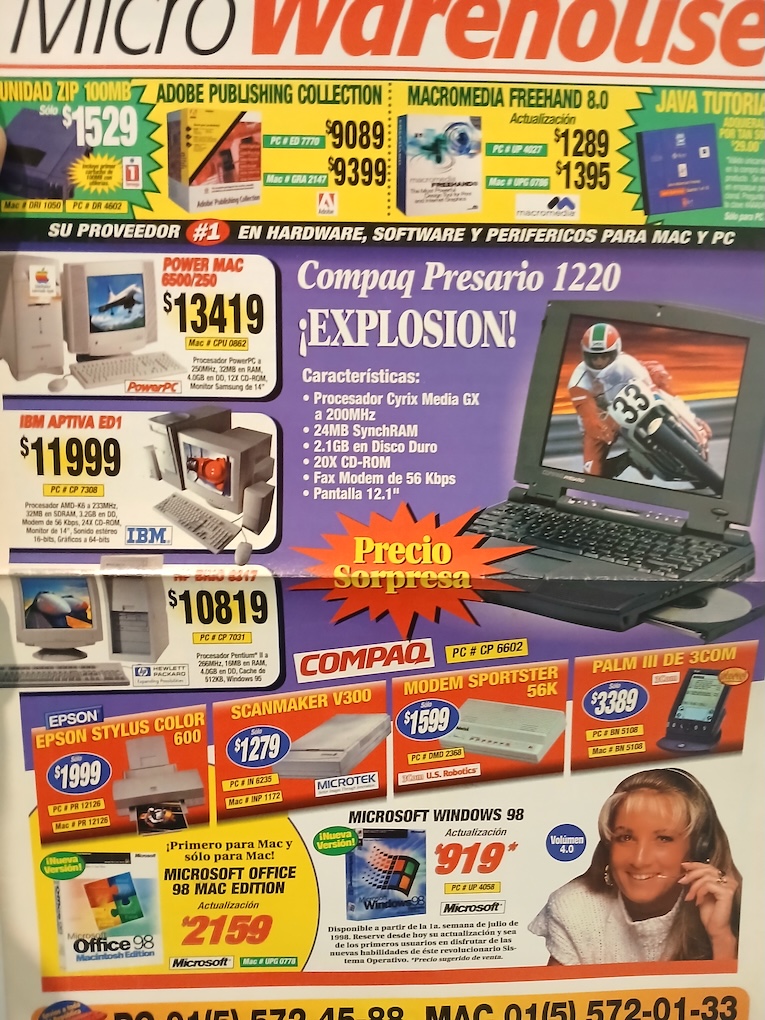
Along 1997, I developed some utilities, printer drivers (I had an HP DeskJet 500, and managed to print in color in the Epson Stylus 600), and even managed to send and receive fax using the modem card. It was a time when everyone asked if you had a fax machine to send you advertisements, or to get information. We even bought a fax machine, and the next year, no one asked again for a fax. Welcome to the e-mail!
Anyway, working in machine code was hard, and it was like doing a deep dive in muddy water. Unless you get a dive mask to see under (the notes about addresses and some documentation), you’ll get more and more lost.
Even with all my teen energy, I started to get tired, because I couldn’t code new functions without devising a careful memory planning, how to move the code to make space, or worst, relocate several jumps and introducing unexpected bugs because I missed one change. At some point, I just thought “this could grow” and inside the code you can find sequences of 5 to 10 NOP instructions for further expansion. Another thing you can find is routines out of place, because these didn't fit the original place.
As I was already a regular visitor to an Internet café (or more known in Mexico as cybercafé). One of the first Internet café was located just across the street from the now defunct Bazar Pericoapa, and it also served coffee. We browsed the Internet at the rhythm of "Ciega, sordomuda", "Amor de papel", “Laura no esta” and “Barbie girl”. Of course, they soon recognized their mistake when cappuccinos and expressos were spilled into keyboards, and coffee was never served again.
I was searching anything about the Am29000 processor, and I found about the MetaWare High-C 29k compiler, and GNU C compiler v2.8.1 with support for Am29000. I had no way of buying the High-C 29k compiler, so I could download only the GCC sources, and I found it required at least 2 mb. of RAM in the computer (and probably more if we think in the virtual memory), when my computer only had 512 kb of RAM. Worst, it required two more programs: Flex and Bison.
Also it required a lot of support from the underlining operating system, that I barely had (plus an assembler and a linker). I needed to bootstrap the compiler somehow, but I was completely unwilling to port two big programs for a single use. So, I resorted to a closer galaxy: my C compiler for the transputer.
My main problem was the vastly different architecture of the Am29000 processor with many registers. I couldn’t figure how to assign the registers in my single pass compiler. It was pretty important that normal variables could be kept in local registers, but if a single indirection appeared (for example, &a) then that variable should be kept in memory.
My first try was a port of the Small-C compiler to Am29000, I know I did it because I made a note in my daily log in December 1997. Probably it was an utter failure and lacking usefulness, because there’s no further mention of it.
Again in February 2, 1998 I mention i needed urgently a C compiler, and I installed DJGPP (a GCC compiler ported to MS-DOS) on a 80486 PC to help with development. I couldn’t use the transputer as it only had 128 KB of onboard RAM.
DJGPP is the abbreviation of DJ G++, I cannot say how so much DJ Delorie helped to developers all around the world when the compilers were still sold for big prices, and this guy created a version of the GNU C++ compiler for DOS that worked right away.
Growing a compiler in the tree
It was until May 6, 1998 when I took the source code of my C compiler for transputer, and managed to compile it with DJGPP as a test. This means I had to replace my non-standard input/output functions with standard C library functions.
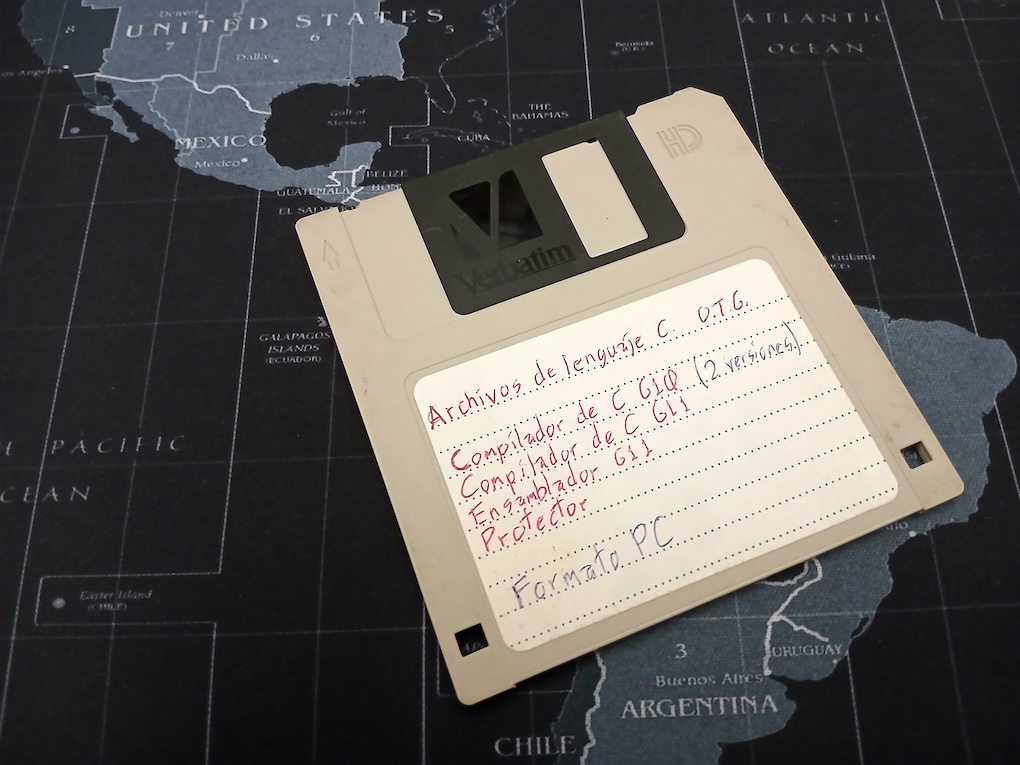
My daily log didn’t include any further information, but while searching for more data, I found I preserved all the steps of the Am29000 C compiler creation in a floppy disk. Here is a picture of the floppy disk with my C compiler progression. I had a vague idea of source code control because I had read about SCCS (Source Code Control System), and my approach was “copy all the daily files into a floppy disk”.
This floppy disk contains two enhanced transputer C compilers, and the first version of my Am29000 C compiler.
This transputer C compiler now worked in a PC machine the same as in the original transputer. The tree expressions were preserved in arrays. One array for pointing to left nodes, another array for pointing to right nodes, another array for node value, and another array for node type. Of course, this means you couldn’t create complex expressions without expanding the array as needed. You can find this compiler in my transputer git in the directory cc0.
This is a code excerpt of the expression tree as an array (function crea_nodo):
I slowly created a plan: There was a single way of creating an Am29000 code generator. I needed to parse the whole function into memory, then I would know how many local registers were required, detect references to local variables, and then I could build a register allocator.
Next, I redesigned the expression tree generator using dynamic memory (malloc/free), and using struct. It was still made for the transputer (see the cc1 directory). Per my notes, on breaks I was also playing a demo of Tomb Raider 2.
This is a code excerpt of how the node creation code changed:
This code is far more legible than the original one, and also it is only limited by the total of memory available.
In May 13, 1998, I finally bite the bullet, and I started to work in the main parser to save all of the code in an intermediate representation in trees with linked lists. A sequence of statements became a linked list, and any nested statement became a branch in the list. I got a cold this time, I watched “The Jungle Book” with Jason Scott Lee in Laserdisc, and after I recovered I went directly to create the code generator for the Am29000 processor.
The whole port took me well over two weeks, and I had to make several small tests for the code generator. For example, this is the code generator in the transputer:
/*
** Codigo para cada operador binario, y algunos unarios.
*/
gen_oper(oper, rev)
  int oper, rev;
{
  if (oper == N_NULO) return;
  if (oper == N_CUENTA)
    emite_linea("wcnt");
  else if (oper == N_OR)
    emite_linea("or");
  else if (oper == N_XOR)
    emite_linea("xor");
  else if (oper == N_AND)
    emite_linea("and");
  else if (oper == N_IGUAL) {
    emite_linea("diff");
    emite_linea("eqc 0");
  } else if (oper == N_SUMA)
    emite_linea("bsub");
  else if (oper == N_MUL)
    emite_linea("prod");
And this is the same fragment for the Am29000 processor:
/*
** Codigo para cada operador binario, y algunos unarios.
*/
gen_oper(oper, inmediato, reg1, reg2, constreg, control)
  int oper, inmediato, reg1, reg2, constreg, control;
{
  int reg;

  if (oper == N_OR || oper == N_AOR) {
    gen_inst1("or", inmediato, reg1, reg2, constreg);
  } else if (oper == N_XOR || oper == N_AXOR) {
    gen_inst1("xor", inmediato, reg1, reg2, constreg);
  } else if (oper == N_AND || oper == N_AAND) {
    gen_inst1("and", inmediato, reg1, reg2, constreg);
  } else if (oper == N_CD || oper == N_ACD) {
    gen_inst1("sra", inmediato, reg1, reg2, constreg);
The transputer with its stack architecture takes care of the register usage, but in the Am29000 the compiler controls how each register is used. And now for just an example of the complexity of the processor, this is the code for starting a C function:
/*
** Prologo de función:
**
** o Asigna las variables virtuales a los registros o a la memoria.
** o Asigna el espacio requerido.
** o Copia los argumentos de la entrada (si es requerido)
*/
prologo_funcion()
{
  int variable, temp, por_copiar = 0, posicion, registro;

/*
** Asignamos los registros (por el momento no se sabe si van a ser locales
** o globales), también asignamos espacio en la pila pero aún falta
** determinar si va a ser corrida para hacer espacio a argumentos que
** deben ser copiados.
*/
  variable = 0;
  while (variable < variables_virtuales) {
    switch (virtuales[variable] & 3) {
      case 0:   /* Variable para asignar como se pueda */
        if (virtuales[variable + 1] != 0) {  /* ¿ Necesita apuntador ? */
          virtuales[variable] = (pila << 2) | 1;
          pila += virtuales[variable + 2] ? 8 : 4;
        } else {                             /* No, queda en registro */
          if (virtuales[variable + 2])       /* Alinea punto flotante */
            pila_regs = (pila_regs + 1) & ~1;
          virtuales[variable] = pila_regs << 2;
          pila_regs += virtuales[variable + 2] ? 2 : 1;
        }
        virtuales[variable + 1] = 0;
        break;
      case 1:   /* Variable que debe quedar en memoria */
        temp = virtuales[variable] >> 2;
        virtuales[variable] = (pila << 2) | 1;
        pila += temp;
        virtuales[variable + 1] = 0;
        break;
      case 2:   /* Cálcular cuantos argumentos debemos copiar */
        if (virtuales[variable + 1] != 0)    /* ¿ Necesita copiar ? */
          por_copiar += virtuales[variable + 2] ? 8 : 4;
        break;
    }
    variable += 3;
  }
/*
** Corremos la pila para hacer espacio a los argumentos que deben copiarse,
** también copiamos los argumentos y pre-asignamos registros a los args.
*/
  pila += por_copiar;
  variable = 0;
  while (variable < variables_virtuales) {
    switch (virtuales[variable] & 3) {
      case 1:   /* Variable que debe quedar en memoria */
        virtuales[variable] = (((virtuales[variable] >> 2) +
                                por_copiar) << 2) | 1;
        break;
    }
    variable += 3;
  }
  if (pila != 0)
    gen_inst1("sub", SI, 125, 125, pila);
  pila_regs = (pila_regs + 1) & ~1;
  posicion = 0;
  variable = 0;
  while (variable < variables_virtuales) {
    switch (virtuales[variable] & 3) {
      case 2:   /* Copiamos los argumentos requeridos */
        if (virtuales[variable + 1] != 0) {
          virtuales[variable + 1] = 0;
          registro = virtuales[variable] >> 2;
          virtuales[variable] = (posicion << 2) | 1;
          if (posicion == 0) {
            gen_inst2("store 0,4,", NO, registro + 128, 125);
            posicion += 4;
            if (virtuales[variable + 2]) {
              gen_inst1("add", SI, 96, 125, posicion);
              gen_inst2("store 0,4,", NO, registro + 128, 96);
              posicion += 4;
            }
          } else {
            gen_inst1("add", SI, 96, 125, posicion);
            gen_inst2("store 0,4,", NO, registro + 128, 96);
            posicion += 4;
            if (virtuales[variable + 2]) {
              gen_inst1("add", SI, 96, 96, 4);
              gen_inst2("store 0,4,", NO, registro + 129, 96);
              posicion += 4;
            }
          }
        } else {
          if (total_regs == -1 && pila_regs <= 4)
            temp = 128;
          else if (total_regs == -1)
            temp = 130 + pila_regs;
          else
            temp = 130 + total_regs + pila_regs;
          virtuales[variable] = (((virtuales[variable] >> 2) + temp)
                                 << 2) | 2;
        }
        break;
      case 3:    /* Ajustamos los argumentos que vienen en memoria */
        virtuales[variable + 1] = 0;
        virtuales[variable] = (((virtuales[variable] >> 2) + pila) << 2) | 1;
        break;
    }
    variable += 3;
  }
  if (total_regs == -1 &&    /* Si no se llama ninguna función y solo hay */
      pila_regs <= 4) {      /* 4 registros utilizados o menos, */
    pila_regs = 0;           /* No nos hace falta la pila de registros */
    variable = 0;
    while (variable < variables_virtuales) {
      switch (virtuales[variable] & 3) {
        case 0:    /* Asignar registros gr116 - gr119 */
          virtuales[variable] = ((virtuales[variable] >> 2) + 116) << 2;
          break;
        case 2:    /* Los parametros siguen en locales */
          virtuales[variable] &= ~3;
          break;
      }
      variable += 3;
    }
  } else {                   /* Pedimos espacio en la pila de registros */
    variable = 0;
    while (variable < variables_virtuales) {
      switch (virtuales[variable] & 3) {
        case 0:    /* Asignar registros locales */
          virtuales[variable] = ((virtuales[variable] >> 2) +
                                  total_regs + 130) << 2;
          break;
        case 2:    /* Los parametros ya tienen sus posiciones */
          virtuales[variable] &= ~3;
          break;
      }
      variable += 3;
    }
    pila_regs += total_regs;
    pila_regs += 2;
    if (pila_regs > 128)
      error("Demasiadas variables locales");
    else if (pila_regs + pila_args > 508)
      error("Demasiados argumentos");
    gen_inst1("sub", SI, 1, 1, pila_regs << 2);
    emite_linea("asgeu 64,gr1,gr126");
    gen_inst1("add", SI, 129, 1, (pila_regs + pila_args) << 2);
  }
}
Each C local variable, including function arguments, becomes a "virtual" variable (in my line of thought it was a variable that wasn't assigned to anything yet, so it is virtual). Type 0 is a normal variable (with an indirection count to detect if it should be copied to memory), type 1 is an array, and type 2 is an argument (again with the indirection count).
It makes space in the memory stack (gr125) if required, then it copies any arguments that should be in memory (passed structs, or because the & operator is used), and after doing this it proceeds to assign local registers for the remaining variables. It is pretty advanced the detection of zero function calls to avoid completely the stack frame and use gr116-gr119 as local registers (as suggested by the AMD manuals), and finally comes the very simple stack frame creation in three instructions (sub, asgeu, and add)
The function epilogue in turn looks pretty simple:
This first version of the C compiler source code for the Am29000 is available in my git in the cc directory.
Around the same time that I was doing the work in the compiler, I was also developing the assembler to process the Am29000 instructions into a binary, along a small library to interface it to my windowed operating system.
The assembler is pretty small and direct because the Am29000 instruction set is orthogonal, this means the registers can be used interchangeably in any instruction, and there is symmetry in the instructions (for example, all arithmetic/logical instructions have three operands). This early MS-DOS version of the assembler is also available in my git in the asm directory.
Finally, I started translating the compiler to my operating system. It took me a while to make it to compile itself because the memory leaks filled the small RAM. The major bug was that I forgot to free the memory for expression trees after processing each function. Anyway, I had a ton of bugs in the code generator which required urgent corrections, and it was until May 27, 1998 when the compiler became able to generate the same assembler listing as the PC version.
To assemble the compiler output, I needed an assembler running inside the operating system, so I printed the source code of the assembler I wrote in C language with the PC, and ported it by hand to machine code. Finally in Jun 1, 1998 I was able to compile the C compiler, assemble it, and generate exactly the same binary each time.
I couldn’t find any traces of that machine code assembler, but as I was thinking about it, I remember that I managed to compile the C version, and I was so happy that I simply moved the assembler to the right folder to test the compiler with it, and it worked, but I noticed a few minutes later that I had overwritten my machine code assembler.
I had a C compiler, but no way to edit programs, so I started coding the text editor in machine code in June 22, 1998, and I got a working text editor by July 1. The text editor was 50k of machine code, and it would be deployed like that for several years. So far this was two full months to create a complete development environment (text editor, C compiler, and assembler)
Once the text editor was ready, I was able to iron out the compiler bugs one by one, like the buggy floating-point support, the wrong struct assignment, and non-efficient code. The final test was compiling the 3D polygonal modeler I built for my transputer operating system, and this was the final nail in the transputer coffin.
In September 1998, I redesigned the compiler's lexical analyzer to be based on lexical components (thus removing the last Small-C remains), speeding up the parsing, and I started updating the compiler to ANSI C. No more K&R function declarations. For example, this is the statement parsing function before the lexical analyzer was implemented, still doing comparisons with expected text:
/*
** Analizador de sentencias.
**
** Llamado cuando la sintaxis requiere una
** sentencia, retorna un número que indica
** la última sentencia procesada.
*/
struct sentencia *sentencia()
{
  struct sentencia *temp;

  if ((car_act == 0) && (eof))
    return NULL;
  if (match("{"))
    return p_bloque();
  if (amatch("if", 2))
    return s_if();
  if (amatch("while", 5))
    return s_while();
  if (amatch("do", 5))
    return s_do();
  if (amatch("for", 3))
    return s_for();
  if (amatch("switch", 6))
    return s_switch();
  if (amatch("case", 4))
    return s_case();
  if (amatch("default", 7))
    return s_default();
  if (amatch("goto", 4))
    return s_goto();
  if ((temp = p_etiqueta()) != NULL)
    return temp;
  if (amatch("return", 6))
    return s_return();
  if (amatch("break", 5))
    return s_break();
  if (amatch("continue", 8))
    return s_continue();
  if (match(";"))
    return NULL;
  almacena_expresion(SI);   /* Asume que es una expresión */
  temp = nueva_sentencia(t_expresion);
  temp->def.t_expresion.expresion = ultimo_nodo;
  punto_y_coma();
  return temp;
}

/*
** Checa punto y coma.
*/
punto_y_coma()
{
  if (match(";") == 0)
    error("Falta punto y coma");
}
And this is the same parsing function after the lexical analyzer was implemented. Now clave_lex encompasses the whole keyword, speeding up the parsing:
/*
** Analizador de sentencias.
**
** Llamado cuando la sintaxis requiere una
** sentencia, retorna un número que indica
** la última sentencia procesada.
*/
struct sentencia *sentencia(void)
{
  struct sentencia *temp;

  if (eof)
    return NULL;
  if (clave_lex == C_LLAVEI) {
    obt_lex();
    return p_bloque();
  }
  if (clave_lex == C_IF) {
    obt_lex();
    return s_if();
  }
  if (clave_lex == C_WHILE) {
    obt_lex();
    return s_while();
  }
  if (clave_lex == C_DO) {
    obt_lex();
    return s_do();
  }
  if (clave_lex == C_FOR) {
    obt_lex();
    return s_for();
  }
  if (clave_lex == C_SWITCH) {
    obt_lex();
    return s_switch();
  }
  if (clave_lex == C_CASE) {
    obt_lex();
    return s_case();
  }
  if (clave_lex == C_DEFAULT) {
    obt_lex();
    return s_default();
  }
  if (clave_lex == C_GOTO) {
    obt_lex();
    return s_goto();
  }
  if ((temp = p_etiqueta()) != NULL)
    return temp;
  if (clave_lex == C_RETURN) {
    obt_lex();
    return s_return();
  }
  if (clave_lex == C_BREAK) {
    obt_lex();
    return s_break();
  }
  if (clave_lex == C_CONTINUE) {
    obt_lex();
    return s_continue();
  }
  if (clave_lex == C_PCOMA) {
    obt_lex();
    return NULL;
  }
  almacena_expresion(SI);   /* Asume que es una expresión */
  temp = nueva_sentencia(t_expresion);
  temp->def.t_expresion.expresion = ultimo_nodo;
  punto_y_coma();
  return temp;
}

/*
** Checa punto y coma.
*/
void punto_y_coma(void)
{
  if (clave_lex != C_PCOMA)
    error("Falta punto y coma");
  else
    obt_lex();
}
By the way, this means the old compiler could use a variable named while because the word wasn't reserved. Also, I coded manually the lexical analyzer.
Now for the windowed OS
Originally the C compiler was written for the G11V1 computer, and all of this was developed with a SCSI hard disk. I don’t have even the slightest idea of where could it be. This was only for a few months, as in June 18, 1998 I ported everything to the new G11V2.
The main difference between both systems was the byte order. G11V1 has big-endian byte order, and G11V2 has little-endian byte order. This was relatively easy because the Am29000 processor has a Byte Order bit that can be configured.
Also the G11V2 used ISA slots, and had three PCI slots (recycled connectors from 486 motherboards). This was because the ISA cards were being phased out, and the new video cards come as PCI.
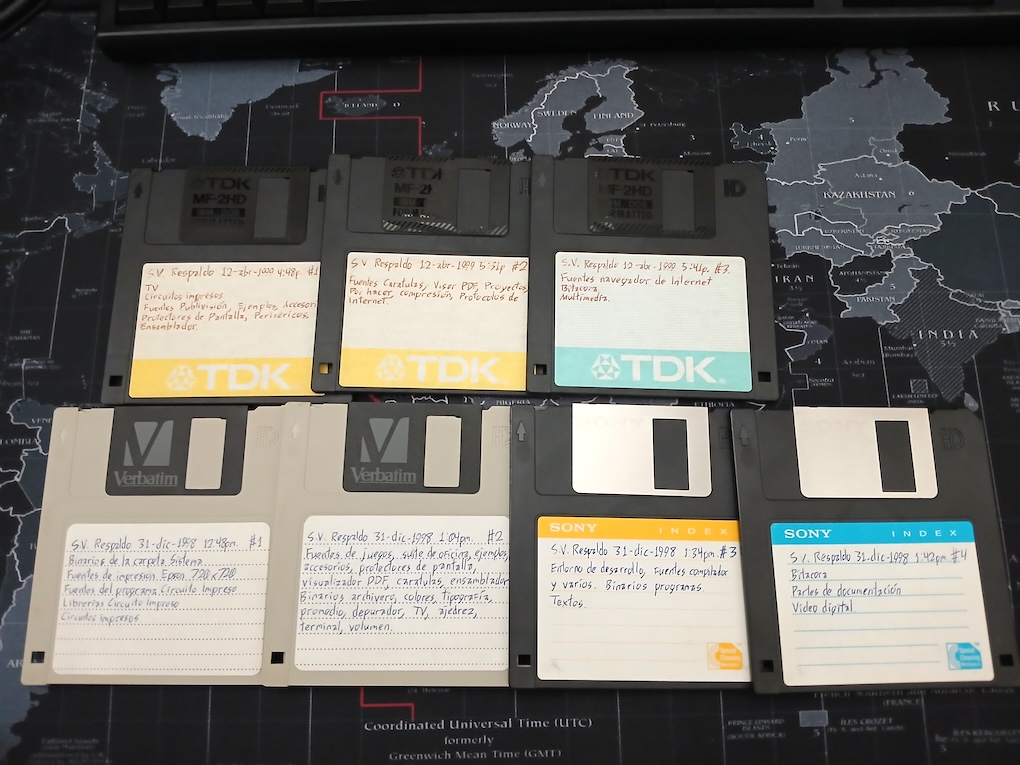
This article is possible because I put together seven floppies with the almost complete files for my operating system including source code and support programs. Three are from December 30, 1998, and four are from April 24, 1999. It was an information explosion from the single floppy disk from Spring 1997.
My floppy disk set of backups from 1998 and 1999.
However, these floppies didn’t cover the windowed operating system because it was in ROM. The G11V2 started with 512 KB of RAM, and a way to get more space for programs was moving the operating system right into the 1 MB. of ROM, releasing 256 KB of memory for programs. So I looked into my archives trying to find the EPROM image of the G11V2.
I finally found two images of the windowed operating system (simply named FENIX.BIN). For some reason, I never updated the copyright messages, so both were pretty similar.
It took me like 2 hours of boring binary comparison until I discovered the table of window classes. Some functions still were at 0x000f0000 thru 0x000fffff while in the other version these were at 0x00030000 to 0x0003ffff. This was for making space for another program inside the ROM.
Finally, I found the copyright date that I was looking for: It read 1996-1999 in the ROM with functions at 0x000f0000 to 0x000fffff. And 1996-2000 in the other ROM with functions at 0x00030000 to 0x0003ffff.
Let’s load this in the emulator
I needed to put this in the emulator, make sure the little-endian byte order was selected, and try to run it. I expected a few hurdles in the way, because the G11V2 computer uses a PCI video card.
After putting together the ROM file, it booted in a very similar way, again I patched the gr95 register to 0x00040040 to avoid the traps running the math emulation code. The first stop indeed was a LOAD 0,0x00,gr98,gr96 instruction where it used the address 0xc8000000.
This address gets the PCI configuration space for the first slot. If it doesn’t find a card, it tries two more addresses 0xd0000000 and 0xe0000000.
It tries to find a SYM53C810 SCSI card. I had forgotten completely about it. It isn’t required now, because I can patch out the SCSI controller and reuse my subset of SCSI commands to handle an emulated hard disk drive. In my daily log I was incredibly happy I got the SYM53C810 manual direct from the manufacturer so I could do faster SCSI access.
The vendors ID are two for Cirrus Logic cards (GD-5440 and GD-5446) and one for a Trident TGUI-9685 (that just happens to have the same number as a TGUI-9660). I’m glad to see that https://pci-ids.ucw.cz/ still exists! We used to bought discarded PCI cards with no labels, and use this site to discover what was it.
For my purposes, the GD-5440 is the easiest to get working, as it is basically a GD-5429 modified to have PCI bus. The PCI configuration space contains the headers for the cards in the slots. For emulation (and in order to patch minimally the OS), I’ve implemented only a stub header for the video card.
I copied my GD-5429 driver almost directly, expecting it to fail when it was required. However, a port 0x0a79 access got me completely disoriented, a few minutes later, I remembered this was ISA Plug&Play. For a while, Microsoft determined a standard to create an auto-configuration protocol for ISA cards, so Windows 98 could detect automatically the card type. It was mostly used for sound cards, and then forgotten completely when PCI sound cards appeared.
I started by patching the write to ISA port 0x0a79, and then I saw how the code tried to read and I had to patch 0x020b, 0x020f, 0x0213... what the heck? I had to analyze the code to see that the code probes all ports starting from 0x020b and up to 0x0303. You can see this code at 0x00068980. If for some reason the OS crashes, it generates a whole ROM disassembly, a whole RAM disassembly, and a RAM dump.
And finally the moment came! My code tried to write to the PCI headers of the video card to enable it (I put a stub there), and then it tried to read a video register:
This extremely hideous code is because the processor reads everything as a word, and then it needs to extract the byte from the PCI I/O word (the ISA code looked more legible *sigh*)
And finally it tried to write to the video memory:
CL-GD5440: Unhandled 32-bit write to 0x81000000
This means the whole video memory is in a linear map, and of course, it simplifies a lot the video emulation. Having linear video memory was a dream at the time because it also guaranteed faster access. I also got a different access type to the bitblt engine:
After adding the memory handling, I reached the point where I could see the wallpaper. It looked nice! Although with a bug in the cursor color. This was because the data is written as a word to the PCI bus, with the byte in the place where the PCI card looks for the byte! But my code still expected the byte in the lower bits.
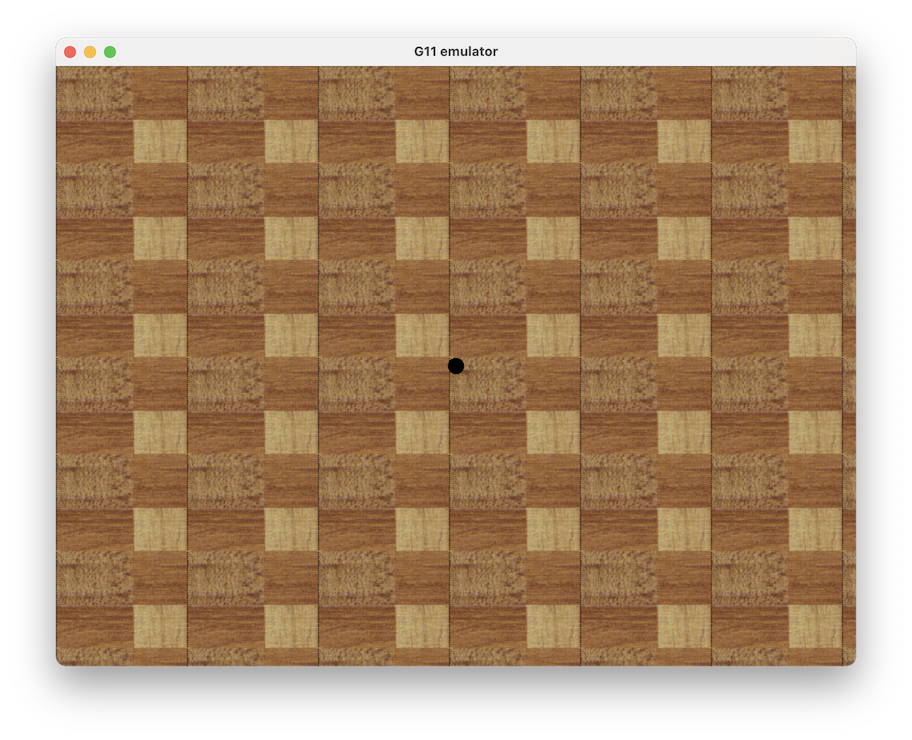
The first boot up of my windowed operating system with the emulated PCI video card.
It got stuck, and I was pretty sure a menu button should appear on the screen to run programs. I couldn’t find anything obvious, until I enabled the debug log again. It tried to changed the keyboard leds, and the status port didn’t returned a ready state so it entered an infinite loop. I put a stub, and then I could see the operating system bar at the top, and the letters were trash. Yes!!!!
I forgotten completely that the GD5440 chip could receive the bitmap for bitblt expansion directly through the main memory address. Once the bitblt is programmed for a bitmap expansion (with or without transparency), it disconnects the bus from the memory, and instead takes any access as bitmap data. You can write the bitmap in chunks of 32 bits at a time, and of course it was 4x faster than the old method of writing a single byte to RAM in Write Mode 4.
I had to separate the bitblt emulation and made it a simple state machine. When a memory access appears it is feed to the bitblt, expands it, and keeps working until the full rectangle is processed.
I only had to do a further correction in the access to the memory as 16-bit where it could draw only the left-side pixels because I applied the word mask before checking for high or low word.
A big hard drive! 80 mb
The windowed operating system has a hard-coded program menu that calls programs in predefined locations in the hard drive. I modified the buildboot.c program to create boot sectors with little endian byte order, and also to create hard disk images.
The original G11V2 computer used a 80 mb. SCSI hard drive that sounded like a plane turning engines on, however, for this resurrected demo I don’t need so much space. I preferred to limit it to 40 megabytes.
We need a minimum program to be able to handle everything in an easier way: Archivero. I started building a floppy disk image to be dragged and dropped in the hard disk image.
Now it is time to test if it works. Let’s build the floppy disk image along an empty hard disk image. At this point I decided the emulator should detect the computer type by the size of the input image, if you drop first an image bigger than 1.44 mb. it decides it is a G11V2 (so it can still work for emulating the G11V1 of my previous article). Oops! I forgot completely I didn’t made yet the storage and keyboard patch.
After coding the patch to call the SCSI emulation and handle the SDL keys untranslated, I lost almost 3 hours trying to discover why no sector read was made. This time, the file system wrapper called the SCSI initialization, as it didn’t found the SCSI card (the code I shown first) then it never tried to look for the drives. The solution: a single instruction CONST gr96,1 patched into the SCSI layer initialization.
I had a small bug in buildboot.c, it still built the FAT entries in big-endian format. So no file could be read. I also had to add conversion from UTF-8 to my local format, because most of my files have accents in its names.
I noticed also the 40 MB hard drive image was detected as 24,576 kb. (or around 24 MB). I went to the filesystem detection code:
Not very helpful, it only detects the signature G11a (0x47313161) and the special NOP (0x70406161), then it copies eight words of data into the drive structure. It immediately gets the free space with this routine:
You can see SRL gr98,gr97,0x1f and ADD lr7,lr7,gr98 to count the total number of zero blocks (free blocks). It reads an entry from the FAT using this subroutine:
My mistake now was pretty clear. The eighth word (offset 0x5c in the drive structure) should be the size of each FAT entry, while the fifth word (offset 0x50 in the drive structure) should be the pointer to the first block of the root directory. I had interchanged places.
I updated buildboot.c with the corrections, and the hard disk image said correctly 40,932 kb. free.
Putting all together
With the C compiler, assembler, and text editor put together in the hard disk image (and the 1999 library), I tried to compile one of the operating system games. It compiled, and assembled, and then crashed. I reviewed the executable and it had “bugs”, like improper instructions in the wrong places, and the first JMP instruction was replaced with a CONST instruction.
Maybe the string comparison in the assembler triggered a bug? I inserted debug code in the emulator to see the input strings and the assembled instruction output, and it was right!
I remembered the binary was generated directly into the output file, and then the assembler goes back to patch undefined labels. I saw an apparent bug on seeking back into the file.
Maybe the filesystem had a bug that had been corrected? I did a comparison of the 1999 version against the 2000 version, and no changes. In the process I made a few annotations of addresses:
0x0004ceb0 is the function table for the filesystem service (vector 0x48)
0x0004e520 is the function table for the G11a file system
0x00050a00 is the function table for the serial port services.
I noticed the assembler patched several CALL instructions on a row, for anyone with knowledge of the Am29000, you cannot put together several CALL instructions because of the delay-slot (the delay-slot is an instruction executed before doing the CALL because it simplifies the execution pipeline design). So maybe the table was being built incorrectly.
Four days into looking for the bug, and I finally inserted debug code into the fseek operation. Internally, the file system can handle 64-bit numbers (I really was thinking in the future), and I got a weird 0xffffffff in the upper word.
Can you see the bug? The C language doesn’t expand automatically your type based on your input operands. Even if tmp is uint64_t, the operations are still done in uint32_t.
This is because in the assembler I had the following operation (haha, sorry, non-standard C):
  fread(salida, &valor, 4);
  fseek(salida, -4, 1);
It reads a word from the generated binary output, and moves the file pointer back to rewrite the word with the updated value. However, as the carry flag isn’t working then the file pointer was invalid, and the file system generated an error that although returned wasn’t processed because an operation like this cannot fail (famous last words).
I corrected immediately the emulator:
uint64_t tmp = (uint64_t) v1 + v2 + vc; \
And finally, my C compiler is alive again to compile Am29000 programs another day. I could compile easily the Bloques game, and it appeared in all its past glory. This program is available for compilation in the folder Entorno de desarrollo/Juegos/Bloques.c.
In line 318 replace case 0x15: with case TECLA_ARRIBA: as it is designed to use the keypad 5 to rotate pieces. Not available in laptop keyboards.
The Internet is coming!
At this point of early 1999, I was pretty happy going to Ipsograph in Ciudad Satélite, our new Internet café after the demise of the one at Coapa. I used Internet most than ever, downloading documents and bring back floppies with these, along standards, and software that I wanted to test. I got the PDF standard and I coded a small PDF viewer that was incredibly useful to read the tons of datasheets that started appearing as PDF files.
The next big program I needed to code was increasingly clear in my future: A web browser. At the time, I used Netscape Navigator a lot, and I didn’t had Internet at home, so it wasn’t a high-priority in my list. Microsoft's Internet Explorer 3.0 started being free, there was even people at the Plaza Satélite mall giving away CDs. Truth to be told, it was a terrible and slow browser, and for a while Netscape still had the edge but they had to reduce their price to $29.95 USD, but I don't remember anyone selling Netscape copies in Mexico. It was already installed in Internet café's computers.
Around 1996, I had written a HTML viewer for the Z280 computer, and I coded a TCP/IP protocol stack in assembler language. But I couldn’t convince my father of getting an Internet subscription.
I knew Internet was getting into everything, so I took my old Z280 code, gave it a look, and I started coding my 32-bit Internet browser in March 22, 1999. The development was far more easy in C language, by April 9, 1999 I had a very simple HTML browser that I could run locally. I know that because I’ve the floppies with this early source code (you can find it inside the hard disk image as X:/Entorno de desarrollo/Explorador de Internet/Navegador de Internet.c or inside the 1999 directory in my git)
I also was coding little by little the TCP/IP protocol stack and as it was the age of modems, also the PPP protocol (Point-to-Point Protocol), along PAP (Password-Authentication-Protocol), plus some AT commands to control the modem.
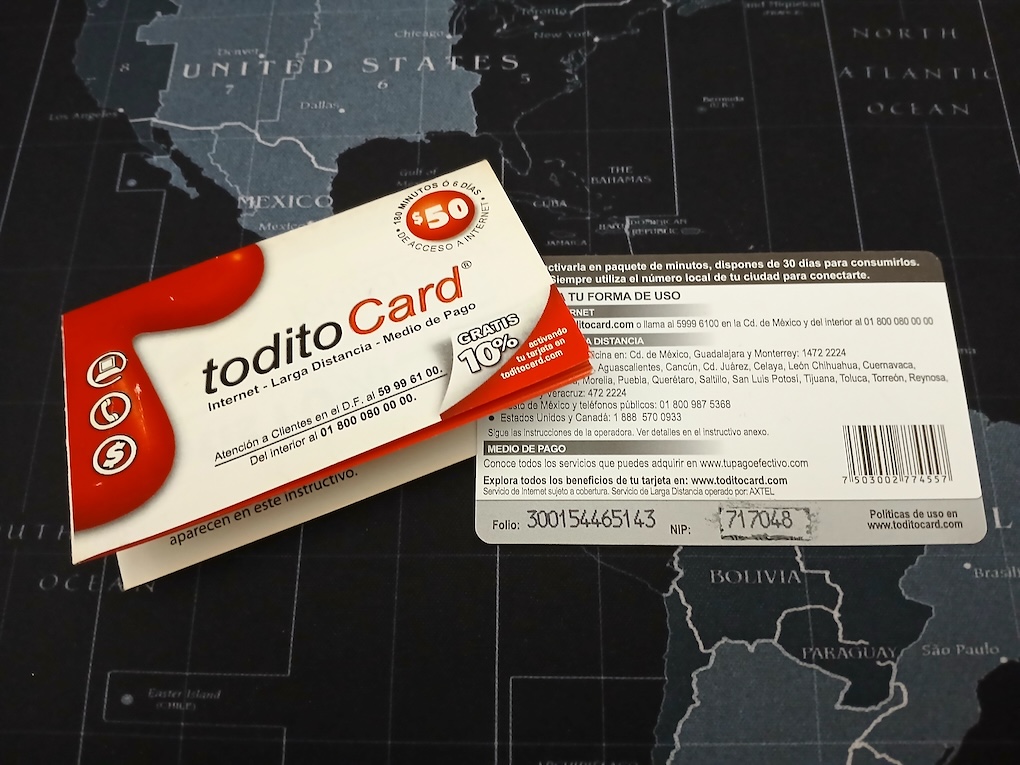
Todito Card for prepaid Internet access via modem. Circa 2001.
The browser started being useful for reading the HTML files in CD-ROM discs we bought, and the network protocols were tested against a Linux box I configured myself with a PPP server (using a null serial cable). It was until June 24, 1999 when I managed to connect to Internet for the first time, using a modem, and a friend’s account in Prodigy.
I was astonished I could download my first file using my own software. I remember the radio at the time still played Bitter Sweet Symphony.
This year, 1999, was the last time everything was so simple. Protocols started to evolve for more advanced requirements, and Javascript had just made its appearance and spread like fire.
Where is that browser?
Where I could find that browser from 1999? One big problem when you are developing things so fast is that you don’t stop to backup things. As I said before, I found some floppies with an early version of the Internet Browser, but no binary.
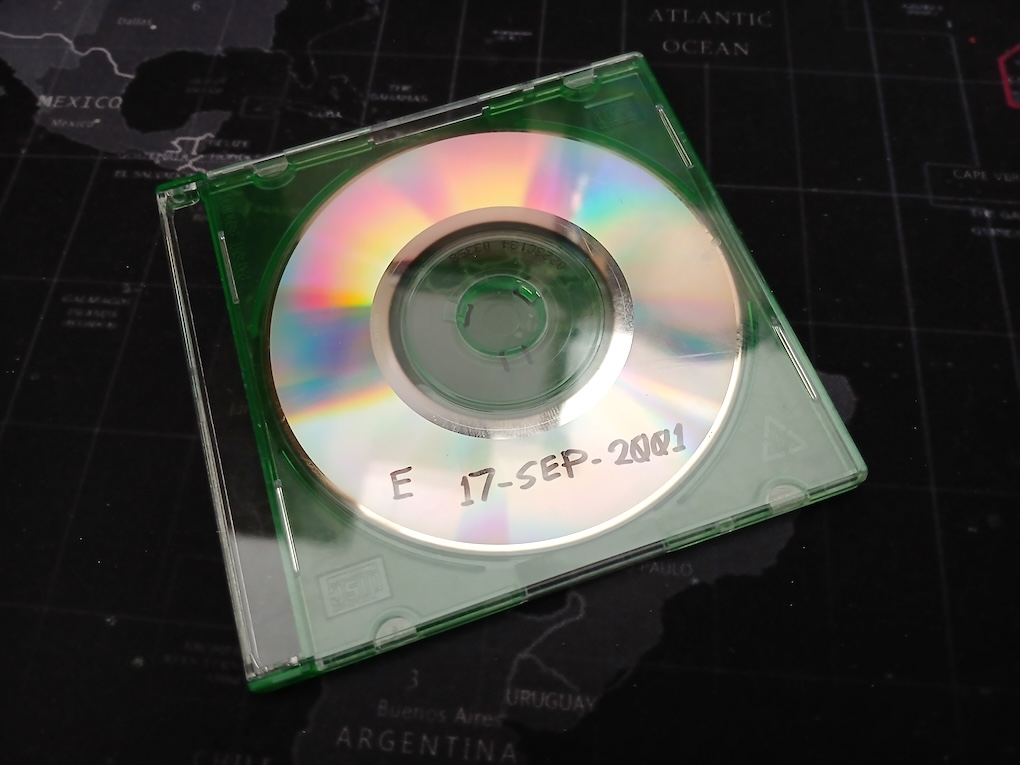
I had to look into my very old boxes, and then it was there, a dozen of CD backups that I made once or two times a year. I discovered sadly only two were still readable. One from 2001, and another from 2003. Another problem, all these are mini-CD, and these cannot be inserted into a Macbook Pro. I had to use an external CD drive.
My backup Mini-CD for 2001.
Now the good luck, I made backups inside the main directory of each project. So the web browser had the very early backup I saw on my floppy discs (April 4, 1999) and the second backup was the one I was looking for: November 11, 1999, just a few days after I got age 21.
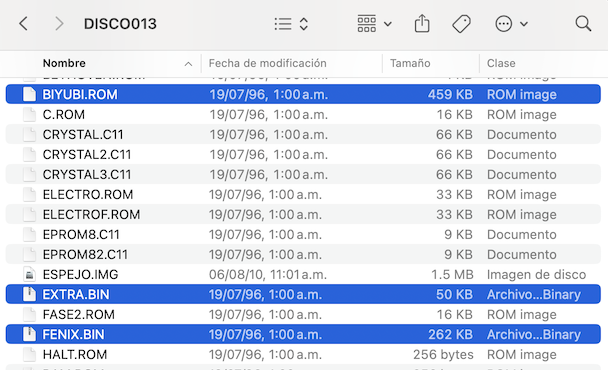
The executable for my Internet browser measured 362 KB. How this was fitted into 512 KB of RAM? I was somewhat puzzled, until I discovered I lost the time searching for a CD, because I already had the floppy disc with the file BIYUBI.ROM in the same disk where I got my 1999 windowed operating system. It never was loaded into RAM, instead the program was burnt into the EPROM.
The files for building a G11V2 ROM. The dates are incorrect as these were fixed in the disk operating system.
It is disk number 13 in my backups, it sounds appropiate for 1999 *chuckles*
The history went like this: The G11V1 computer was updated to 1 mb. of EPROM, and the upper 512 kb were filled with a startup sound (a marimba excerpt from a CD), so I removed this and I burned the web browser in the same space, along the TCP/IP protocol stack.
So this means I’ve found my own holy grail: My first working web browser able to connect to the Internet.
Let’s boot that browser
Now I needed a small program to boot up the Internet browser. My OS has a small code to start the first task (the top bar with the menu):
The first argument in lr2 is the task name, the second argument in lr3 is the code location, lr4 and lr5 contain pointers to the pair of stacks required (remember the Am29000 has one stack for local variables, and another for bigger things), and lr6 and lr7 contains the size of these stacks.
This function is called internally when booting up an executable file. The files are made executable just by putting an attribute 0x0100, and the lower bits are used to mark hidden file, read-only file, and directory.
The executable header for starting up the web browser looks like this:
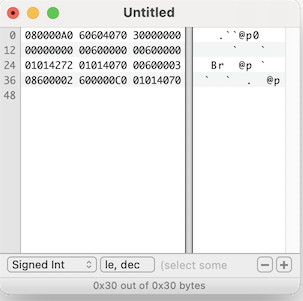
0x00000000: 0xa0000008  JMP *+8
0x00000004: 0x70406060  NOP
0x00000008: 0x00000030  ; Size in bytes of the program.
0x0000000c: 0x00000000  ; Space for zero-initialized variables.
0x00000010: 0x00006000  ; Size of the first stack (24K)
0x00000014: 0x00006000  ; Size of the second stack (24K)
0x00000018: 0x72420101  ; Call to OS
0x0000001c: 0x70400101  NOP

0x00000020: 0x03006000  CONST gr96,0x0000	; Start the browser program from the ROM.
0x00000024: 0x02006008. CONSTH gr96,0x0008
0x00000028: 0xc0000060  JMPI gr96
0x0000002c: 0x70400101  NOP
The fact there is no further code doesn’t affect the operating system, as it will relinquish control with cooperative multitasking. The cooperative multitasking works in an unprotected environment, and it just saves the current PC for returning later (it doesn’t mind the browser code isn’t inside the original task loaded from the disk) So let’s type this.
Typing hexadecimal for creating a minimum executable for my OS.
It was almost 11pm when I discovered the minimum size for an executable program is 64 bytes, and that size should be also in the header. I could get a quick glance of the web browser before it crashed.
After a whole day of debugging, I found it managed to show an error message before crashing. The message was “Protocolo desconocido en dirección” (unknown protocol in address).
Fortunately, I have the source code of the web browser, and I could track the first access to the homepage. It was an array called pagina_base[] (homepage) and following the assembler code, I could find it was expected in an absolute RAM address. Gotcha! I forgot completely about the data for the web browser.
The data area for the web browser was uninitialized! After some disassembly I could deduct it started at 0x80006980 for the web browser, and 0x80002980 for the TCP/IP stack. This also means I did an automated program to calculate relocations for fixed RAM position (where could it be?)
However, it was not so easy. Do you remember I used C language? There is initialized data that should be copied into RAM preceding the zero'ed area. After I took this in account, it worked!!! But the menus didn’t appear, after a small analysis I discovered the RAM was copied in a wrong place. I thought it was 0x80006980 when it should be 0x80006d80.
I tried to load a page, and it got stuck. Oh my! Why I made something so complicated???
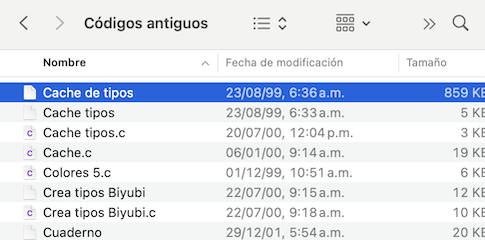
Turns the browser tried to load a cache of bitmapped fonts, but I didn’t had the file at hand!!! I had to search for it in the Mini-CD backup, and fortunately I found the file “Cache de tipos” dated August 23, 1999. This file is composed of bitmap fonts I got from X/Window, and some pregenerated fonts made with the Type 1 rasterizer. This way the web pages displayed faster in my 12 mhz. system.
The typefaces cache file for my web browser.
Once this was in place (and in the right folder), my web browser went back to life for the first time in 27 years. A tear dropped from my eye watching this again. It is like going back in time.
The browser is named Biyubi, after a Zapotec word meaning “search non-stop”. It was suggested by my uncle.
I made some further changes in buildboot.c so you get the exact dates these files were backup (frozen in time), and it creates directories automatically as I was losing time rebuilding hard disk images when I found a bug. There is a script build_os.sh that takes all files from the 1999 directory, and rebuilds the hard disk image.
I was pretty sure I had a cache of old webpages that could be included, but I couldn’t find it, and besides it still could carry a copyright problem. So... Are you ready? Could it be possible, maybe, to get a last ride from this web browser?
Let’s connect this to Internet
There isn’t a lot you can do in the modern Internet with a web browser from 1999. The Internet has evolved several iterations with new protocols and standards.
The browser originally connected using my own TCP/IP protocol stack, but this software is tied to the use of a modem to get into the Internet, and a stack of point-to-point protocols (PPP, LCP, PAP, etc.) The code is there in the ROM (address 0xe0000), and the modem was an external one connected over a serial port, US Robotics 33.6k. I loved the slick look of the small white box with the leds strip, and of course the connection noises.
It is way easier if I simply patched the network services to use directly the DNS and a translation layer for the TCP protocol. So I did that, I patched the network services so it pointed to an address table that in turn contained emulator traps. And for my web browser I only needed to resolve a DNS name, and access the TCP protocol.
This is the a portion of the code I worked in the midnight.
case 0x15:  /* resolver (solve DNS name) */
    pc0 = REG_B;
    c = regs[REG_AA(0x82)]; /* Get name */
{
    struct addrinfo hints, *result, *rp;
    int s;
    char hostname[256];
    char *ap;

    ap = hostname;
    while (ap < hostname + 255) {
        *ap++ = read_byte(c);
        c++;
    }
    *ap = '\0';
    /* Returns -1 for non-existent */
    /* Returns host order domain number */

    memset(&hints, 0, sizeof(hints));
    hints.ai_family = AF_INET;  /* ipv4 */
    hints.ai_socktype = SOCK_STREAM;

    s = getaddrinfo(hostname, NULL, &hints, &result);
    if (s != 0) {
        regs[96] = -1;
    } else {
        struct sockaddr_in *ipv4;

        rp = result;
        ipv4 = (struct sockaddr_in *) rp->ai_addr;
        regs[96] = ipv4->sin_addr.s_addr;
    }
    fprintf(stderr, "Solving %s to 0x%08x, returning to 0x%08x\n", hostname, regs[96], regs[REG_AA(0x80)]);
}
    break;
case 0x1b:  /* tcp_abrir */
    pc0 = REG_B;
    c = regs[REG_AA(0x82)]; /* Source port !!! */
    d = regs[REG_AA(0x83)]; /* IP address */
    e = regs[REG_AA(0x84)]; /* Target port */
    {
        int s;
        struct sockaddr_in sserver;

        s = socket(AF_INET, SOCK_STREAM, 0);
        if (s < 0) {
            regs[96] = -1;  /* !!! */
        } else {
            sserver.sin_family = AF_INET;
            sserver.sin_addr.s_addr = d;
            sserver.sin_port = htons(e);
            if (connect(s, (struct sockaddr *) &sserver, sizeof(sserver)) != 0) {
                close(s);
                regs[96] = -1;  /* !!! */
            } else {
                regs[96] = s;
            }
        }
        fprintf(stderr, "tcp_abrir(0x%08x, 0x%08x, 0x%08x), returning 0x%08x\n", c, d, e, regs[96]);
    }
    break;
case 0x1d:  /* tcp_leer */
    pc0 = REG_B;
    c = regs[REG_AA(0x82)]; /* Socket */
    d = regs[REG_AA(0x83)]; /* Address */
    e = regs[REG_AA(0x84)]; /* Bytes */
    {
        int s;
        unsigned char *buffer;

        buffer = malloc(e + 1);
        s = c;
        f = read(s, buffer, e);
        if (f < 0) {
            fprintf(stderr, "errno = %d\n", errno);
            if (errno == EWOULDBLOCK || errno == EINTR)
                f = -33;    /* My OS value for EWOULDBLOCK */
            else
                f = -1;
        } else {
            for (e = 0; e < f; e++) {
                write_byte(d, buffer[e]);
                d++;
            }
        }
    regs[96] = f;
    fprintf(stderr, "tcp_leer(0x%08x, 0x%08x, 0x%08x), returning 0x%08x\n", c, d, e, regs[96]);
    free(buffer);
    }
    break;
So far I've implemented it only for macOS, maybe later I’ll do the Windows sockets (Update Aug/20/2026: Now it works also in Windows). It was pretty easy to solve the host name, and I did everything almost right in the first step, but it stopped short of reading the HTTP response, until I discovered my flush function (tcp_vaciar) was closing the socket because I did copy&paste based on the close socket function (tcp_cerrar).
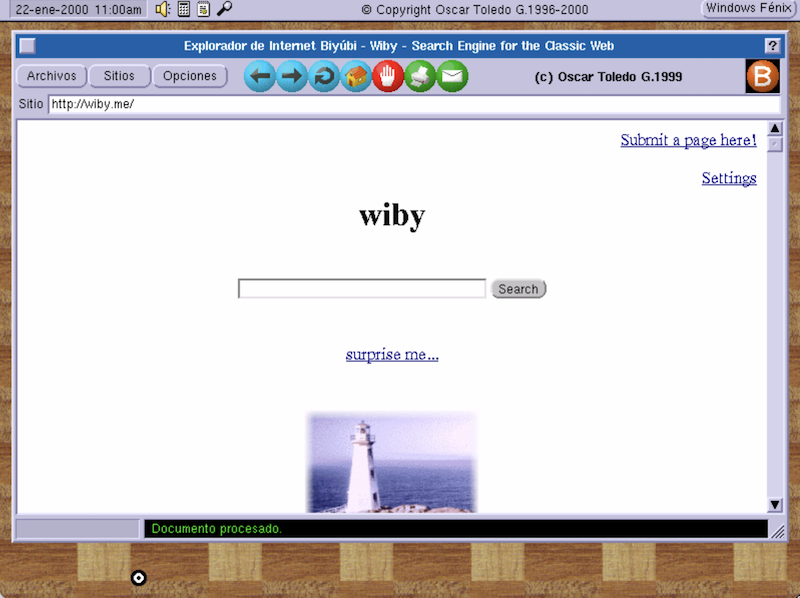
It was exciting watching how my browser accessed the net again for the first time in 27 years.
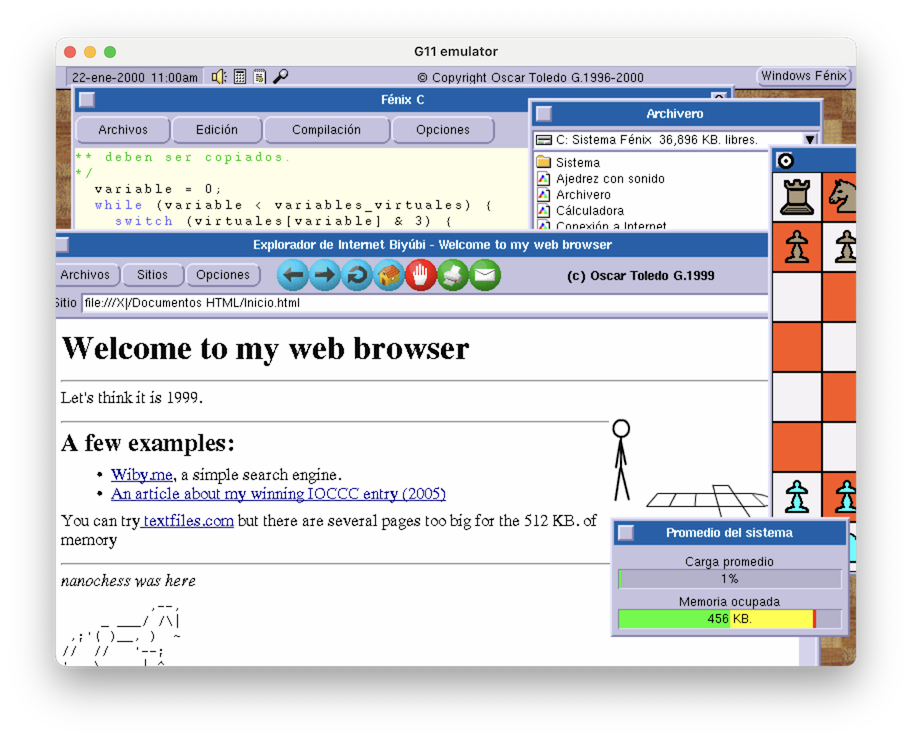
My 1999 web browser visiting wiby.me in 2026.
What we have here
Download my Am29000 emulator from Github, execute it, and drag&drop the harddisk_master.img file inside the window (do it in the center of the window), you can also drag&drop further image files to account for a removable floppy disk drive.
My windowed operating system (or Windows Fénix for short, later Sistema Fénix) in 1999 looked a lot more modern. The date is shown at the top-left corner of the screen (click it to change the date), there are four fixed icons: Volume (not working), Calculator, System Status, and change screen resolution (not working). On the top-right corner of the screen is a button for displaying a fixed menu of programs. You can double-click title bars to minimize windows.
The only working programs are Ajedrez, Archivero, Fénix C, Circuito Impreso, Publivisión, and Bloques (just compile it from source using Fénix C)
You can also print source code to any of the supported printers. You need to configure the fonts for printing in Fénix C in Opciones-Impresión. I already put some free fonts (located in Sistema/Tipos de letra). By the way, I had a crash trying to print until I remembered the system requires the Sistema/Temporal folder to create temporary files.
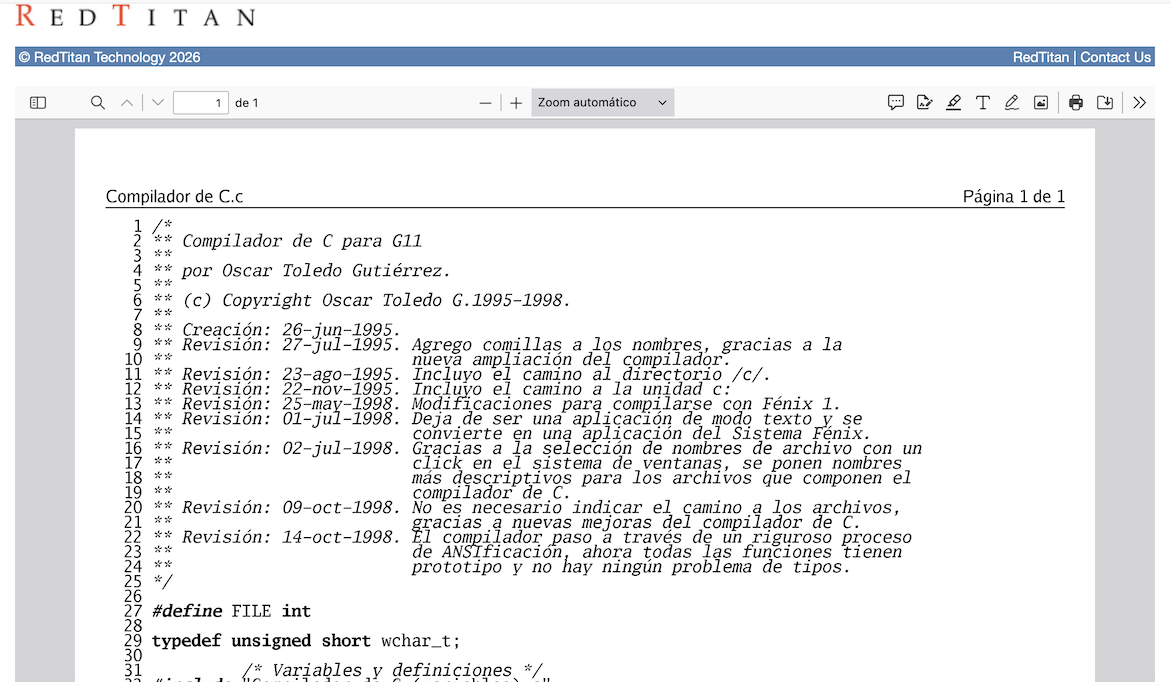
For HP LaserJet IIP printers you can see the generated printer.txt document using redtitan.org. Rename with extensión PCL.
A source code file printed with Fénix C for HP LaserJet IIP.
The source code for the ANSI C compiler and the assembler are in the Entorno de Desarrollo folder. Did you notice I recommended drag&drop the hard disk image in the center of the window? If you want to recompile the C compiler or the assembler, you need extra memory (disabling the web browser), to do this drag&drop the hard disk image file into the bottom-right corner of the emulator window (use the Promedio utility to see the free memory). It is pretty amazing to watch the 10,203 lines of source code being compiled and getting exactly the same binary.
In fact for compiling again the binary for my old version of Publivision (I did this myself, no source code in the git, yet), there is a further trick: closing the editor window. Otherwise the compiler lacks memory. Publivisión is almost the first working version from the last day of 1998, so it is filled with bugs, anyway you can create documents with it and print them. This early application already runs at 10,000 lines of source code.
Circuito Impreso is my PCB editor and it was the most polished application at the time. It is pretty easy to use, just experiment with left click (draw) and right click (select). The credits image was scanned from an AMD manual cover. This program runs at 9,000 lines of source code. There are a few bugs in the display driver when moving items, but I'll correct it later.
To run the web browser, open a file browser (Archivero), and click in Explorador de Internet. I was wobbling between naming it Explorador or Navegador (Netscape wasn't fond of anyone saying Navigator). I also put the source code to my very first browser (more like a viewer), and I don’t know if it can be compiled, but probably it would need some changes. I’ve the source code for the version in ROM, but it lacks the adapted JPEG library. I’ll consider whether I publish it incomplete or if I remake the JPEG library. If you remember, my C compiler didn’t yet had a linker, so I modified the JPEG library to be able to include its individual files. With so many files, it took several minutes to get a new compilation of the browser!
Another thing you’ll notice in the web browser is that I’m still not emulating the Am29050 processor, and the JPEG library depends a lot on the multiplication instruction, so it is incredibly slow for displaying JPEG images. It is so 1999!
Postmortem
I had an idea of what I was doing, but I was more driven by the excitement of the discovery about learning how to do things. In retrospective, I simply did something that was required at the time. A windowed operating system, a development environment (text editor, C compiler, and assembler), a desktop publishing program, a printed circuit board editor, and a web browser. An innovation ages away from my transputer operating system.
I didn't notice when starting this article, but after reading it over, I mean, I coded close to 50,000 lines of source code in one year!
It was starting to be competitive, and it was because I put my own ideas everywhere, and I optimized the things a lot in order to fit a small machine. The next year, 2000, my programs looked a lot better, I made them stable, and a lot more professional. The C compiler got a linker, so I didn’t need to compile 10,000 lines of source code just for a little change. My browser supported Javascript, and I was almost on par with the browsers at the time. We got many interviews that year, even one on radio Radioactivo 98.5 that was very famous at the time.
We used the chips we had available. The Am29000 was showing its age, we moved already to the Am29050 processor. The G11V3 computer had a lot more memory, it was clocked faster, and with hardware changes it could use the extra memory available in the PCI video card. I started to implement CSS in my web browser. But that's an history for another article.