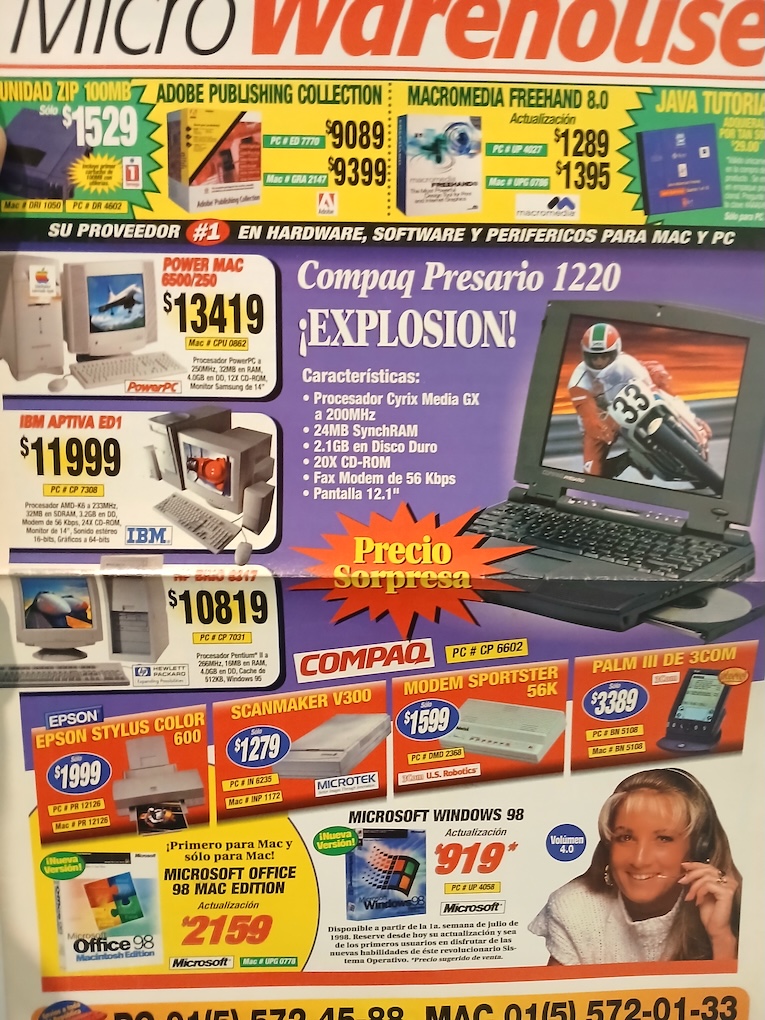
El periodo de tiempo es navidad de 1998 y hasta mi cumpleaños en 1999. Tenía 20 años. Internet se estaba extendiendo como fuego en México, Bruce Willis justo había salvado la tierra de un asteroide gigante, nuevas carreras emergieron para la naciente Internet (fue un año de oro para los diseñadores gráficos), la gente estaba asustada de que el bug del año 2000 lanzara un apocalipsis digital (incluso los Simpsons pasaron un episodio donde Homero olvida actualizar las computadoras), y Arnold Schwarzenegger estaba matando demonios a balazos en El Fin de los Días.
Encontremos un compilador de C
Por 1997 desarrollé varias utilidades, controladores de impresora (tenía una HP DeskJet 500 y me las arreglé para imprimir en color con una Epson Stylus 600), también me las arreglé para enviar y recibir faxes usando una tarjeta de modem. Era una época en que todos preguntaban si tenías fax para enviarte anuncios, u obtener información. Incluso compramos una máquina de fax, y el siguiente año, nadie volvió a pedir un fax. ¡Bienvenido al e-mail!
De cualquier forma, trabajar en código máquina era complicado, y era como realizar buceo profundo en aguas lodosas. A menos que tuvieras una mascara para ver en el fondo (las notas de direcciones y documentación) te perdías cada vez más y más.
Incluso con toda mi energía adolescente, comencé a sentirme cansado, porque no podía codificar nuevas funciones sin diseñar un plan de memoria cuidadoso, como mover el código para hacer espacio, o peor, relocalizar varios saltos e introducir errores inesperados porque me faltó un cambio. En algún punto, pensé "esto puede crecer" y dentro del código puedes encontrar secuencias de 5 a 10 instrucciones NOP para futura expansión. Otra cosa que se puede encontrar son rutinas fuera de lugar, porque no cabían en el espacio original.
Como ya era un visitante regular de un café Internet (o más conocidos en México como cibercafé). Uno de los primeros cafés de Internet estaba ubicado justo cruzando la calle del desaparecido Bazar Pericoapa, y también servían café. Explorábamos Internet al ritmo de "Ciega, sordomuda", "Amor de papel", “Laura no esta” y “Barbie girl”. Por supuesto, pronto reconocieron su error cuando los capuchinos y expresos se derramaron en los teclados, y el café nunca se volvió a servir.
Estaba buscando cualquier cosa acerca del procesador Am29000, y me enteré del compilador MetaWare High-C 29k y el compilador GNU C v2.8.1 con soporte para Am29000. Pero no tenía forma de comprar el compilador High-C 29k, así que descargé solamente las fuentes del GCC, y encontré que requería 2 megabytes de RAM en la computadora (y probablemente más si pensamos en la memoria virtual), cuando mi computadora solo tenía 512 kb. de RAM. Peor, requería dos programas extras: Flex y Bison.
También requería mucho apoyo del sistema operativo, que yo vagamente tenía (más un ensamblador y un enlazador). Necesitaba arrancar el compilador de alguna forma, pero me detenía completamente la idea de portar dos programas enormes para un solo uso. Así que recurrí a una galaxia más cercana: mi compilador de C para transputer.
Mi problema principal era la arquitectura completamente diferente del procesador Am29000 con muchos registros. Y no podía imaginarme como asignar los registros en mi compilador de un solo paso. Era muy importante que las variables normales pudieran caber en registros locales, pero si una sola indirección aparecía (por ejemplo, &a) entonces esa variable debía quedar en memoria.
Mi primer intento fue un port del compilador de Small-C al Am29000, se que lo hice porque puse una nota en mi bitácora de diciembre de 1997. Probablemente fue una tremenda falla y no tenía utilidad, porque no hay ninguna mención más.
De nuevo el 2 de febrero de 1998 menciono que necesito urgentemente un compilador de C e instalé DJGPP (un compilador GCC portado a MS-DOS) en una PC 80486 para ayudar con el desarrollo. No podía usar el transputer porque solo tenía 128 kb. de memoria.
DJGPP es la abreviación de DJ G++, No pueden ni imaginar cuanto ayudó DJ Delorie a los desarrolladores de todo el mundo cuando los compiladores todavía se vendían a precios altos, y esta persona creó una versión del compilador GNU C++ para DOS que funcionaba de inmediato.
Cultivando un compilador en el árbol
Fue hasta el 6 de mayo de 1998 cuando tomé el código fuente de mi compilador de C para transputer, y me las arreglé para compilarlo con DJGPP como una prueba. Esto significa que tuve que reemplazar mis funciones no estándar de entrada y salida con las funciones de la librería C estándar.
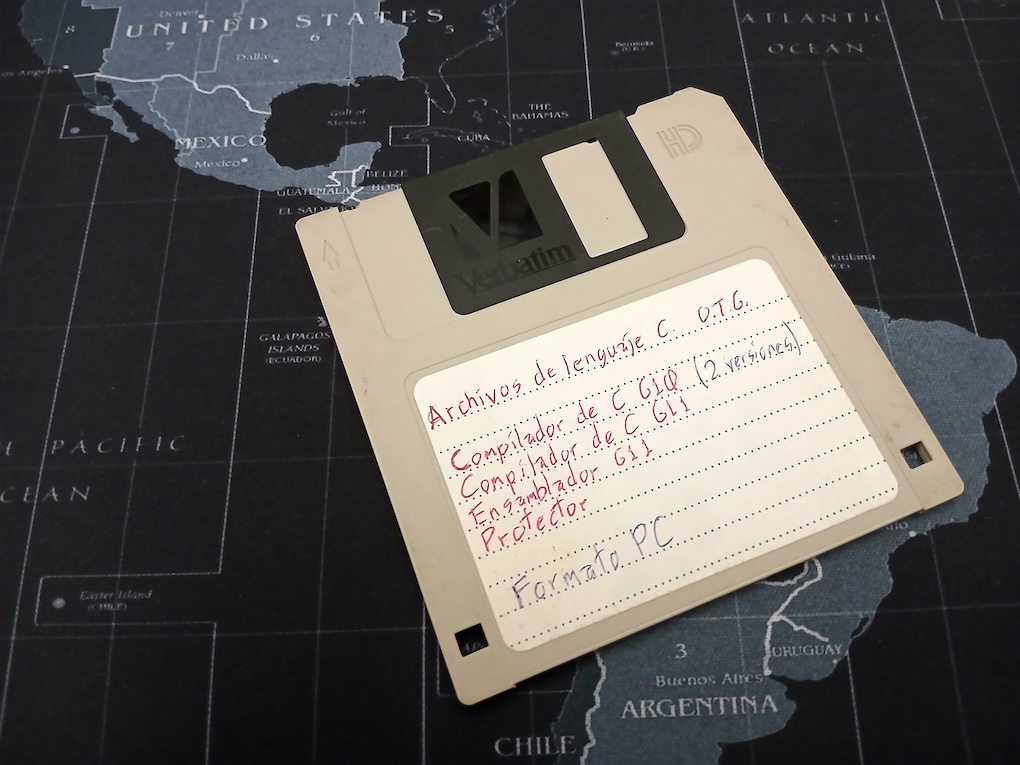
Mi bitácora no incluye mayor información, pero mientras buscaba más datos, encontré que preservé los pasos de la creación del compilador de C para Am29000 en un disco flexible. Aquí hay una foto del disco con mi progresión de compiladores de C. Tenía una vaga idea del control de código fuente porque había leído acerca de SCCS (Source Code Control System), y mi forma de hacerlo era "copiar todos los archivos del día en un disco flexible".
Este disco flexible contiene dos compiladores de C mejorados, y la primera versión del compilador de C para Am29000.
Este compilador de C para transputer ahora funcionaba en una máquina PC igual que el transputer original. Los árboles de expresiones estaban preservados en arreglos. Un arreglo para apuntar a los nodos de la izquierda, otro arreglo para apuntar a los nodos de la derecha, otro arreglo para el valor del nodo, y otro arreglo para el tipo de nodo. Por supuesto, esto significa que no puede crear expresiones complejas sin expandir el arreglo como fuera necesario. Puede encontrar este compilador en el git de mi transputer en el directorio cc0.
Este es un fragmento de código del árbol de expresiones como un arreglo (función crea_nodo):
Lentamente diseñé un plan: Había una sola forma de crear un generador de código Am29000. Necesitaba analizar la función completa en memoria, y entonces sabría cuantas variables locales eran requeridas, detectar referencias a variables locales, y podría construir entonces un asignador de registros.
A continuación rediseñé el generador de árboles de expresiones usando memoria dinámica (malloc/free), y usando struct. Todavía hecho para el transputer (vea el directorio cc1). Por mis notas, en los descansos también jugaba una demo de Tomb Raider 2.
Este es otro fragmento de código mostrando como cambió la creación de nodos:
Este código es bastante más legible que el original, y también solo limitado por el total de memoria disponible.
El 13 de mayo de 1998 finalmente tomé el toro por los cuernos, y comencé a trabajar en el análisis principal para convertir el código en una representación intermedia de árboles con listas enlazadas. Una secuencia de sentencias se volvió una lista enlazada, y cualquier sentencia anidada se convirtió en una rama de la lista. Me dio un resfriado esta vez, y vi “El libro de la selva” con Jason Scott Lee en Laserdisc, y después de recuperarme me fui directamente a crear el generador de código para el procesador Am29000.
El traslado completo me tomó dos semanas, y tuve que hacer varias pruebas pequeñas para el generador de código. Por ejemplo, este es el generador de código para el transputer:
/*
** Codigo para cada operador binario, y algunos unarios.
*/
gen_oper(oper, rev)
  int oper, rev;
{
  if (oper == N_NULO) return;
  if (oper == N_CUENTA)
    emite_linea("wcnt");
  else if (oper == N_OR)
    emite_linea("or");
  else if (oper == N_XOR)
    emite_linea("xor");
  else if (oper == N_AND)
    emite_linea("and");
  else if (oper == N_IGUAL) {
    emite_linea("diff");
    emite_linea("eqc 0");
  } else if (oper == N_SUMA)
    emite_linea("bsub");
  else if (oper == N_MUL)
    emite_linea("prod");
Y este es el mismo fragmento para el procesador Am29000:
/*
** Codigo para cada operador binario, y algunos unarios.
*/
gen_oper(oper, inmediato, reg1, reg2, constreg, control)
  int oper, inmediato, reg1, reg2, constreg, control;
{
  int reg;

  if (oper == N_OR || oper == N_AOR) {
    gen_inst1("or", inmediato, reg1, reg2, constreg);
  } else if (oper == N_XOR || oper == N_AXOR) {
    gen_inst1("xor", inmediato, reg1, reg2, constreg);
  } else if (oper == N_AND || oper == N_AAND) {
    gen_inst1("and", inmediato, reg1, reg2, constreg);
  } else if (oper == N_CD || oper == N_ACD) {
    gen_inst1("sra", inmediato, reg1, reg2, constreg);
El transputer con su arquitectura de pila toma cuidado del uso de registros, pero en el Am29000 el compilador controla como se usa cada registro. Y ahora para un ejemplo de la complejidad del procesador, este es el código para iniciar una función en C:
/*
** Prologo de función:
**
** o Asigna las variables virtuales a los registros o a la memoria.
** o Asigna el espacio requerido.
** o Copia los argumentos de la entrada (si es requerido)
*/
prologo_funcion()
{
  int variable, temp, por_copiar = 0, posicion, registro;

/*
** Asignamos los registros (por el momento no se sabe si van a ser locales
** o globales), también asignamos espacio en la pila pero aún falta
** determinar si va a ser corrida para hacer espacio a argumentos que
** deben ser copiados.
*/
  variable = 0;
  while (variable < variables_virtuales) {
    switch (virtuales[variable] & 3) {
      case 0:   /* Variable para asignar como se pueda */
        if (virtuales[variable + 1] != 0) {  /* ¿ Necesita apuntador ? */
          virtuales[variable] = (pila << 2) | 1;
          pila += virtuales[variable + 2] ? 8 : 4;
        } else {                             /* No, queda en registro */
          if (virtuales[variable + 2])       /* Alinea punto flotante */
            pila_regs = (pila_regs + 1) & ~1;
          virtuales[variable] = pila_regs << 2;
          pila_regs += virtuales[variable + 2] ? 2 : 1;
        }
        virtuales[variable + 1] = 0;
        break;
      case 1:   /* Variable que debe quedar en memoria */
        temp = virtuales[variable] >> 2;
        virtuales[variable] = (pila << 2) | 1;
        pila += temp;
        virtuales[variable + 1] = 0;
        break;
      case 2:   /* Cálcular cuantos argumentos debemos copiar */
        if (virtuales[variable + 1] != 0)    /* ¿ Necesita copiar ? */
          por_copiar += virtuales[variable + 2] ? 8 : 4;
        break;
    }
    variable += 3;
  }
/*
** Corremos la pila para hacer espacio a los argumentos que deben copiarse,
** también copiamos los argumentos y pre-asignamos registros a los args.
*/
  pila += por_copiar;
  variable = 0;
  while (variable < variables_virtuales) {
    switch (virtuales[variable] & 3) {
      case 1:   /* Variable que debe quedar en memoria */
        virtuales[variable] = (((virtuales[variable] >> 2) +
                                por_copiar) << 2) | 1;
        break;
    }
    variable += 3;
  }
  if (pila != 0)
    gen_inst1("sub", SI, 125, 125, pila);
  pila_regs = (pila_regs + 1) & ~1;
  posicion = 0;
  variable = 0;
  while (variable < variables_virtuales) {
    switch (virtuales[variable] & 3) {
      case 2:   /* Copiamos los argumentos requeridos */
        if (virtuales[variable + 1] != 0) {
          virtuales[variable + 1] = 0;
          registro = virtuales[variable] >> 2;
          virtuales[variable] = (posicion << 2) | 1;
          if (posicion == 0) {
            gen_inst2("store 0,4,", NO, registro + 128, 125);
            posicion += 4;
            if (virtuales[variable + 2]) {
              gen_inst1("add", SI, 96, 125, posicion);
              gen_inst2("store 0,4,", NO, registro + 128, 96);
              posicion += 4;
            }
          } else {
            gen_inst1("add", SI, 96, 125, posicion);
            gen_inst2("store 0,4,", NO, registro + 128, 96);
            posicion += 4;
            if (virtuales[variable + 2]) {
              gen_inst1("add", SI, 96, 96, 4);
              gen_inst2("store 0,4,", NO, registro + 129, 96);
              posicion += 4;
            }
          }
        } else {
          if (total_regs == -1 && pila_regs <= 4)
            temp = 128;
          else if (total_regs == -1)
            temp = 130 + pila_regs;
          else
            temp = 130 + total_regs + pila_regs;
          virtuales[variable] = (((virtuales[variable] >> 2) + temp)
                                 << 2) | 2;
        }
        break;
      case 3:    /* Ajustamos los argumentos que vienen en memoria */
        virtuales[variable + 1] = 0;
        virtuales[variable] = (((virtuales[variable] >> 2) + pila) << 2) | 1;
        break;
    }
    variable += 3;
  }
  if (total_regs == -1 &&    /* Si no se llama ninguna función y solo hay */
      pila_regs <= 4) {      /* 4 registros utilizados o menos, */
    pila_regs = 0;           /* No nos hace falta la pila de registros */
    variable = 0;
    while (variable < variables_virtuales) {
      switch (virtuales[variable] & 3) {
        case 0:    /* Asignar registros gr116 - gr119 */
          virtuales[variable] = ((virtuales[variable] >> 2) + 116) << 2;
          break;
        case 2:    /* Los parametros siguen en locales */
          virtuales[variable] &= ~3;
          break;
      }
      variable += 3;
    }
  } else {                   /* Pedimos espacio en la pila de registros */
    variable = 0;
    while (variable < variables_virtuales) {
      switch (virtuales[variable] & 3) {
        case 0:    /* Asignar registros locales */
          virtuales[variable] = ((virtuales[variable] >> 2) +
                                  total_regs + 130) << 2;
          break;
        case 2:    /* Los parametros ya tienen sus posiciones */
          virtuales[variable] &= ~3;
          break;
      }
      variable += 3;
    }
    pila_regs += total_regs;
    pila_regs += 2;
    if (pila_regs > 128)
      error("Demasiadas variables locales");
    else if (pila_regs + pila_args > 508)
      error("Demasiados argumentos");
    gen_inst1("sub", SI, 1, 1, pila_regs << 2);
    emite_linea("asgeu 64,gr1,gr126");
    gen_inst1("add", SI, 129, 1, (pila_regs + pila_args) << 2);
  }
}
Cada variable local del C, incluyendo argumentos de funciones, se vuelve una variable "virtual" (en mi línea de pensamiento una variable que no se ha asignado a nada todavía, es virtual). El tipo 0 es una variable normal (con una cuenta de indirección para detectar si debe ser copiada a memoria), el tipo 1 es un arreglo, y el tipo 2 es un argumento (de nuevo con una cuenta de indirección).
Hace espacio en la pila de memoria (gr125) si se requiere, y entonces copia cualquier argumento que debe estar en memoria (cuando se pasan structs, o porque el operador & es usado), y después de hacer esto procede a asignar registros locales para las variables restantes. Es bastante avanzada la detección de cero llamadas a función para evitar completamente el marco de pila y usar los registros gr116-gr119 como locales (sugerido por los manuales de AMD), y finalmente viene la muy simple creación del marco de pila en tres instrucciones (sub, asgeu, y add)
El epílogo de la función a la vez se ve muy simple:
La primera versión del código fuente del compilador de C para el Am29000 esta disponible en mi git en el directorio cc.
Al mismo tiempo que trabajaba en el compilador, también desarrollé el ensamblador para procesar las instrucciones Am29000 en un binario, junto con una pequeña librería para interfazar mi sistema operativo de ventanas.
El ensamblador es muy pequeño y directo porque el conjunto de instrucciones del Am29000 es ortogonal, esto significa que los registros se pueden usar indistintamente en cualquier instrucción, y que hay simetría en las instrucciones (por ejemplo, todas las instrucciones aritmético/lógicas tienen tres operandos). Esta temprana versión MS-DOS del ensamblador también esta en mi git en el directorio asm.
Finalmente, comencé a trasladar el compilador a mi sistema oeprativo. Me tomó bastante tiempo hacer que se compilara a si mismo, porque las fugas de memoria llenaban la pequeña RAM. El mayor bug fue que olvidé liberar la memoria de los árboles de expresiones después de procesar cada función. De cualquier forma también había un monton de errores en el generador de código que requerían correcciones urgentes, y fue hasta el 27 de mayo de 1998 que el compilador se volvió capaz de generar el mismo listado ensamblador que la versión PC.
Para ensamblar la salida del compilador, requería el ensamblador corriendo dentro del sistema operativo, así que imprimí el código fuente del ensamblador que escribí en lenguaje C con la PC, y lo porté a mano a código máquina. Finalmente, el 1° de junio de 1998 logré compilar el compilador de C, ensamblarlo, y generar exactamente el mismo binario cada vez.
No pude encontrar pistas de ese ensamblador en código máquina, pero mientras lo pensaba, me parece recordar que logré compilar la versión en C, y estaba tan contento que simplemente moví el ensamblador al folder correcto para probar el compilar con este, y funcionó, pero unos minutos después me di cuenta que había reescrito mi ensamblador en código máquina.
Tenía un compilador de C, pero no había forma de editar programas, así que comencé a codificar un editor de texto en código máquina el 22 de junio de 1998, y logré que funcionara bien por el 1° de julio. El editor de texto se componía de 50k de código máquina, y se uso como tal por varios años. Hasta ahora eran dos meses completos para crear un entorno de desarrollo completo (editor de texto, compilador de C y ensamblador)
Una vez que el editor de texto estaba listo, pude sacar los errores del compilador uno por uno, como el soporte defectuoso de punto flotante, asignación incorrecta de structs, y código poco eficiente. La prueba final fue compilar el modelador poligonal 3D que hice para mi sistema operativo de transputer, y este fue el clavo final en el ataud del transputer.
En septiembre de 1998, rediseñé el analizador léxico del compilador para basarse en componentes léxicos (y removiendo así los últimos vestigios de Small-C), acelerando el proceso de código, y comencé a actualizar el compilador a ANSI C. No más declaraciones de función K&R. Por ejemplo, este es el código de proceso de sentencias antes de implementar el analizador léxico, todavía haciendo comparaciones con texto esperado:
/*
** Analizador de sentencias.
**
** Llamado cuando la sintaxis requiere una
** sentencia, retorna un número que indica
** la última sentencia procesada.
*/
struct sentencia *sentencia()
{
  struct sentencia *temp;

  if ((car_act == 0) && (eof))
    return NULL;
  if (match("{"))
    return p_bloque();
  if (amatch("if", 2))
    return s_if();
  if (amatch("while", 5))
    return s_while();
  if (amatch("do", 5))
    return s_do();
  if (amatch("for", 3))
    return s_for();
  if (amatch("switch", 6))
    return s_switch();
  if (amatch("case", 4))
    return s_case();
  if (amatch("default", 7))
    return s_default();
  if (amatch("goto", 4))
    return s_goto();
  if ((temp = p_etiqueta()) != NULL)
    return temp;
  if (amatch("return", 6))
    return s_return();
  if (amatch("break", 5))
    return s_break();
  if (amatch("continue", 8))
    return s_continue();
  if (match(";"))
    return NULL;
  almacena_expresion(SI);   /* Asume que es una expresión */
  temp = nueva_sentencia(t_expresion);
  temp->def.t_expresion.expresion = ultimo_nodo;
  punto_y_coma();
  return temp;
}

/*
** Checa punto y coma.
*/
punto_y_coma()
{
  if (match(";") == 0)
    error("Falta punto y coma");
}
Y esta es la misma función de análisis después de que se implementara el analizador léxico. Ahora clave_lex contiene las palabras reservadas completas, acelerando el análisis:
/*
** Analizador de sentencias.
**
** Llamado cuando la sintaxis requiere una
** sentencia, retorna un número que indica
** la última sentencia procesada.
*/
struct sentencia *sentencia(void)
{
  struct sentencia *temp;

  if (eof)
    return NULL;
  if (clave_lex == C_LLAVEI) {
    obt_lex();
    return p_bloque();
  }
  if (clave_lex == C_IF) {
    obt_lex();
    return s_if();
  }
  if (clave_lex == C_WHILE) {
    obt_lex();
    return s_while();
  }
  if (clave_lex == C_DO) {
    obt_lex();
    return s_do();
  }
  if (clave_lex == C_FOR) {
    obt_lex();
    return s_for();
  }
  if (clave_lex == C_SWITCH) {
    obt_lex();
    return s_switch();
  }
  if (clave_lex == C_CASE) {
    obt_lex();
    return s_case();
  }
  if (clave_lex == C_DEFAULT) {
    obt_lex();
    return s_default();
  }
  if (clave_lex == C_GOTO) {
    obt_lex();
    return s_goto();
  }
  if ((temp = p_etiqueta()) != NULL)
    return temp;
  if (clave_lex == C_RETURN) {
    obt_lex();
    return s_return();
  }
  if (clave_lex == C_BREAK) {
    obt_lex();
    return s_break();
  }
  if (clave_lex == C_CONTINUE) {
    obt_lex();
    return s_continue();
  }
  if (clave_lex == C_PCOMA) {
    obt_lex();
    return NULL;
  }
  almacena_expresion(SI);   /* Asume que es una expresión */
  temp = nueva_sentencia(t_expresion);
  temp->def.t_expresion.expresion = ultimo_nodo;
  punto_y_coma();
  return temp;
}

/*
** Checa punto y coma.
*/
void punto_y_coma(void)
{
  if (clave_lex != C_PCOMA)
    error("Falta punto y coma");
  else
    obt_lex();
}
Por cierto, esto significa que en el compilador viejo se podía usar una variable nombrada while porque la palabra en si no estaba reservada. También el analizador léxico fue escrito a mano.
Ahora para el sistema operativo con ventanas
Originalmente el compilador de C se escribió para la computadora G11V1, y todo esto fue desarrollado con un disco duro SCSI. No tengo la menor idea de donde puede haber quedado. Solo fue por unos pocos meses, ya que el 18 de junio de 1998 se portó todo a la nueva G11V2.
La diferencia principal entre ambos sistemas era el orden de bytes. G11V1 tenía un orden de bytes big-endian, mientras que la G11V2 usaba el orden little-endian. Esto era relativamente fácil porque el procesador Am29000 tiene un bit de orden de byte que puede ser configurado.
También la G11V2 utilizaba slots ISA y tenía tres slots PCI (de conectores reciclados de motherboards 486). Esto era porque las tarjetas ISA iban de salida, y las nuevas tarjetas de video llegaban como PCI.
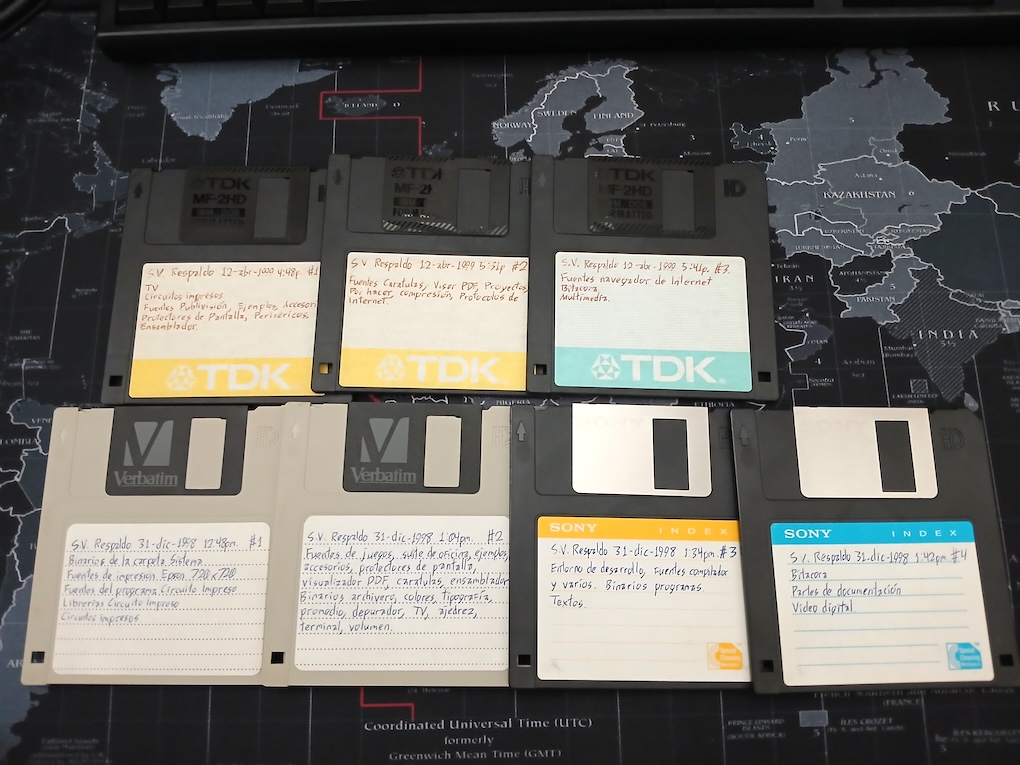
Este artículo es posible porque hice siete discos flexibles con los archivos casi completos de mi sistema operativo incluyendo código fuente y programas de apoyo. Tres son del 30 de diciembre de 1998, y cuatro más del 24 de abril de 1999. Es una explosión de información respecto al único disco flexible de primavera de 1997.
Mi conjunto de respaldos en disco flexible de 1998 y 1999.
Sin embargo, estos discos no cubren mi sistema operativo de ventanas porque estaba en ROM. La G11V2 comenzó con 512 KB. de RAM, y una forma de tener más espacio para los programas era mover el sistema operativo justo en el 1 MB. de ROM, liberando 256 KB. de memoria para programas. Así que miré en mis archivos tratando de encontrar la imagen de EPROM de G11V2.
Al fin encontré dos imágenes del sistema operativos de ventanas (simplemente llamado FENIX.BIN). Por alguna razón, nunca actualicé los mensajes de copyright, así que ambas eran muy similares.
Me tomó como dos horas de aburrida comparación binaria hasta que descubrí la tabla de clases de ventanas. Algunas funciones todavía estaban en 0x000f0000 a 0x000fffff mientras que en la otra versión estaban en 0x00030000 a 0x0003ffff. Esto era para hacer espacio para otro programa dentro de la ROM.
Finalmente, encontré la fecha de copyright que buscaba: Decía 1996-1999 en la ROM con funciones en 0x000f0000 to 0x000fffff. Y era 1996-2000 para la otra ROM con funciones en 0x00030000 to 0x0003ffff.
Carguemos esto en el emulador
Necesitaba poner esto en el emulador, asegurarme de que el orden little-endian estaba seleccionado, e intentar correrlo. Esperaba unos pocos obstáculos en el camino, porque la computadora G11V2 utiliza una tarjeta de video PCI.
Deespués de armar el archivo con la ROM, lo arranqué en una forma muy similar, parcheando el registro gr95 con 0x00040040 para evitar las trampas al correr el código de emulación matemática. La primera parada fue una instrucción LOAD 0,0x00,gr98,gr96 donde usaba la dirección 0xc8000000.
Esta dirección obtiene el espacio de configuración PCI para el primer conector. Si no encuentra una tarjeta, intenta dos direcciones más 0xd0000000 y 0xe0000000.
Intenta encontrar una tarjeta SCSI SYM53C810. Me había olvidado completamente acerca de esta tarjeta. No se requiere ahora, porque puedo parcher el controlador SCSI y reutilizar mi subconjunto de órdenes SCSI para manejar un disco duro emulado. En mi bitácora estaba muy feliz porque obtuve el manual del SYM53C810 directo del fabricante y podía hacer más rápido mi acceso SCSI.
El ID de vendedor eran dos para tarjetas Cirrus Logic (GD-5440 and GD-5446) y uno para una Trident TGUI-9685 (que sucede tiene el mismo número que una TGUI-9660). Me alegra ver que https://pci-ids.ucw.cz/ todavía existe. Solíamos comprar tarjetas PCI descartadas sin etiquetas, y usaba este sitio para identificarlas.
Para mis propósitos, el GD-5440 es el más sencillo de hacer trabajar, ya que es básicamente un GD-5429 modificado para tener bus PCI. El espacio de configuración PCI contiene los encabezados para las tarjetas en los conectores. Para emularlo (y parchear lo menos posible el OS), implementé solo un encabezado básico de la tarjeta de video.
Copié mi driver GD-5429 casi directo, esperando que fallara cuando fuera requerido. Sin embargo, un acceso a la puerta 0x0a79 me desorientó completamente, unos pocos minutos después, recordé que esto era ISA Plug&Play. Por un tiempo, Microsoft puso un estándar para crear un protocolo de autoconfiguración para tarjetas ISA, y que Windows 98 pudiera reconocer automáticamente el tipo de tarjeta. Esto se uso más para las tarjetas de sonido, y se olvidó completamente cuando aparecieron las tarjetas de sonido PCI.
Comencé por parchear la escritura en la puerta ISA 0x0a79, y entonces vi que el código continuaba y leía y yo parcheaba 0x020b, 0x020f, 0x0213... ¿Qué pasa aquí? Tuve que analizar el código para ver que probaba todas las puertas en el rango 0x020b a 0x0303. Puedes ver este código en 0x00068980. Si por alguna razón el OS crashea entonces se genera un desensamblaje completo de la ROM, de la RAM y aparte un vaciado de la RAM.
¡Y finalmente el momento llegó! Mi código intento escribir los encabezados PCI de la tarjeta para activarla (puse un código inactivo), y entonces intentó leer un registro de video:
Este extremadamente horrible código es porque el procesador lee todo como una palabra, y entonces necesita extraer el byte de la palabra del PCI I/O (el código ISA lucía más legible)
Y finalmente intentó escribir en la memoria de video:
CL-GD5440: Unhandled 32-bit write to 0x81000000
Esto significa que la memoria completa de video es un mapa linear, y por supuesto, simplifica mucho la emulación de video. Tener una memoria de video linear era un sueño en ese tiempo porque garantizaba un acceso más rápido. También hallé un tipo de acceso diferente a la maquinaria del bitblt:
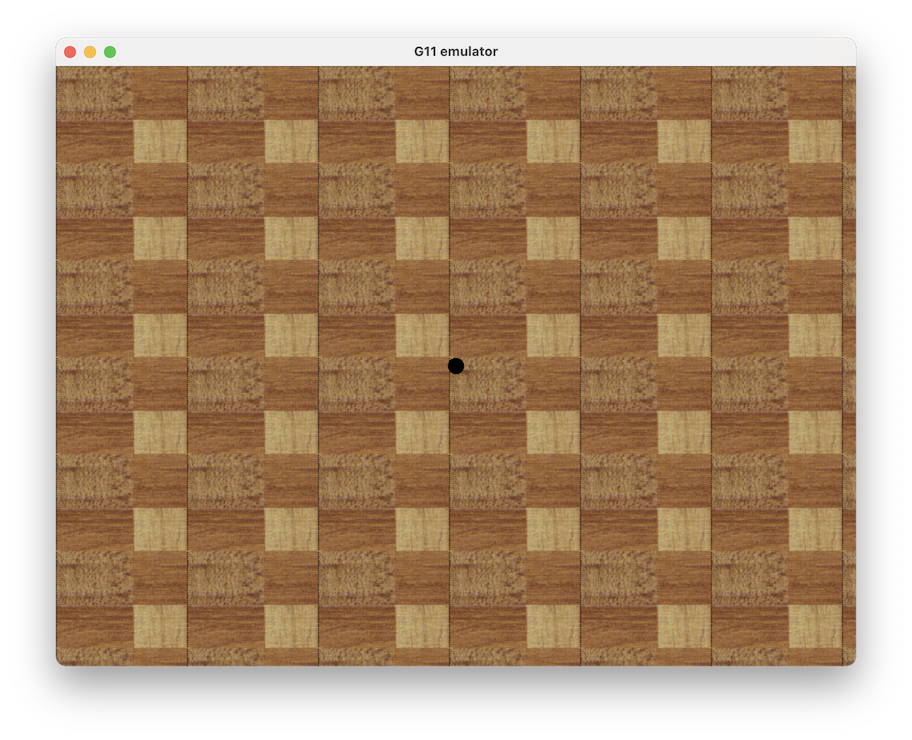
Después de añadir el manejo de memoria, llegué al punto donde podía ver la imagen de fondo de pantalla. ¡Se ve bien! Aunque con un bug en el color del cursor. Esto era porque el dato se escribía en una palabra al bus PCI, pero con el byte en el lugar donde la tarjeta PCI busca un byte. Pero mi código todavía esperaba el byte en los bits bajos.
El primer arranque de mi sistema operativo de ventanas con la tarjeta de video PCI emulada.
Se atoró, y yo estaba muy seguro de que un botón de menú debía aparecer en la pantalla para correr programas. No pude encontrar algo obvio, hasta que activé la depuración de nuevo. Intentaba cambiar el estado de los leds del teclado, pero la puerta de estatus no retornaba un estado listo así que entraba en un bucle infinito. Puse un código que no hace nada, y entonces apareció la barra del sistema operativo en la parte de arriba, y las letras eran basura. ¡¡Si!!
Había olvidado completamente que el chip GD5440 puede recibir su bitmap para expansión bitblt directamente a través de la memoria principal. Una vez que el bitblt es programado para una expansión de bitmap (con o sin transparencia), desconecta el bus de la memoria, y toma los accesos como datos de bitmap. Se puede escribir el bitmap en pedazos de 32 bits al mismo tiempo, y por supuesto es 4 veces más rápido que el viejo método de escribir un byte único en la RAM con el modo de escritura 4.
Tuve que separar la emulación del bitblt y hacerla una máquina de estado simple. Cuando un acceso de memoria aparece se alimenta al bitblt, lo expande, y sigue trabajando hasta que se procesa el rectángulo completo.
Solo tuve que hacer una corrección extra en el acceso a la memoria como 16 bits donde solo dibujaba los pixeles del lado izquierdo porque aplicaba la mascara de palabra antes de verificar si era una palabra alta o baja.
¡Un enorme disco duro! 80 mb
El sistema operativo de ventanas tiene un menu de programas fijo que llama los programas en locaciones predefinidas del disco duro. Y modifiqué el programa buildboot.c para crear sectores de arranque con orden de bytes little endian, y también para crear imágenes de disco duro.
La computadora original G11V2 utilizaba un disco duro SCSI de 80 megabytes que sonaba como un avión encendiendo sus motores, sin embargo, para esta demo resucitada no necesitaba tanto espacio. Preferí limitarlo a 40 megabytes.
Necesitaba un programa mínimo para ser capaz de manejar todo en una forma más fácil: Archivero. Comencé a construir una imagen de disco flexible para ser arrastrada y soltada en la imagen de disco duro.
Now it is time to test if it works. Let’s build the floppy disk image along an empty hard disk image. At this point I decided the emulator should detect the computer type by the size of the input image, if you drop first an image bigger than 1.44 mb. it decides it is a G11V2 (so it can still work for emulating the G11V1 of my previous article). Oops! I forgot completely I didn’t made yet the storage and keyboard patch.
Después de codificar el parche para llamar la emulación SCSI y manejar las teclas SDL sin trasladar, perdí casi 3 horas tratando de descubrir porque ninguna lectura de sector ocurría. Esta vez, la cubierta del sistema de archivos llamaba la inicialización SCSI, pero como no encontraba la tarjeta SCSI (el código que mostré primero) entonces nunca intentaba buscar las unidades. La solución: una sola instrucción CONST gr96,1 parcheada en la capa de inicialización SCSI.
Tenía un pequeño bug en buildboot.c, todavía construía las entradas de la FAT en formato big-endian. Así que ningún archivo podía ser leído. También tuve que agregar la conversión de UTF-8 a mi formato local, debido a que muchos de mis archivos tienen acentos en sus nombres.
También noté que el disco duro de 40 MB era detectado como 24,576 kb. (o alrededor de 24 MB). Fui al código de detección de sistemas de archivos:
No ayudó mucho. Solo detecta la firma G11a (0x47313161) y un NOP especial (0x70406161), entonces copia ocho palabras de datos en la estructura de unidad. Inmediatamente va a calcular el espacio libre con esta rutina:
Puedes ver SRL gr98,gr97,0x1f y ADD lr7,lr7,gr98 para contar la cantidad total de bloques cero (bloques libres). Lee una entrada de la FAT usando esta subrutina:
Mi error ahora era muy claro. La octava palabra (offset 0x5c de la estructura de unidad) debía ser el tamaño de cada entrada de la FAT, mientras que la quinta palabra (offset 0x50 de la estructura de unidad) debía ser el apuntador al primer bloque del directorio raíz. Los había intercambiado de lugar.
Actualicé buildboot.c con las correcciones, y la imagen de disco duro dio correctamente 40,932 kb. libres.
Poniéndolo todo junto
Con el compilador de C, el ensamblador, y el editor de texto juntos en el disco duro (y la librería de 1999), intenté compilar uno de los juegos del sistema operativo. Se compiló, se ensambló, y crasheó. Revisé el ejecutable y tenía defectos, como instrucciones equivadas en los lugares incorrectos, y la primera instrucción JMP fue reemplazada con una instrucción CONST.
¿Tal vez la compración de cadenas del ensamblador tenía un error? Inserte código de depuración en el emulador para ver las cadenas de entrada y la instrucción ensamblada en la salida ¡y estaba correcto!
Recordé que el binario era generado directamente en el archivo de salida, y entonces el ensamblador regresa para parchear las etiquetas indefinidas. Vi un bug aparente al regresar dentro del archivo.
¿Tal vez el sistema de archivo tenía un bug que ya había corregido? Hice una comparación entre la versión de 1999 contra la versión de 2000, y sin cambios. En el proceso hice unas pocas anotaciones de direcciones:
0x0004ceb0 es la tabla de funciones para el servicio de sistema de archivos (vector 0x48)
0x0004e520 es la tabla de funciones para el sistema de archivo G11a.
0x00050a00 es la tabla de funciones para los servicios de puerta serie.
Noté que el ensamblador parcheaba varias instrucciones CALL seguidas, y cualquier con conocimiento del Am29000 sabe que no se puede poner varias instrucciones CALL a causa del delay-slot (el delay-sloy es una instrucción ejecutada antes de realizar el CALL porque simplifica el diseño del pipeline de ejecución). Así que tal vez la tabla se estaba construyendo incorrectamente.
Cuatro días buscando este error, y finalmente inserté código de depuración en la operación fseek. Internamente, el sistema operativo puede manejar números de 64 bits (de verdad estaba pensando en el futuro), y obtuve una extraño 0xffffffff en la palabra superior.
¿Puedes ver el error? El lenguaje C no expande automáticamente tu tipo basado en los operandos de entrada, incluso si tmp es uint64_t, las operaciones todavía se hacen como uint32_t.
Esto es porque el ensamblador tiene la siguiente operación (jaja, lo siento, C no estándar):
  fread(salida, &valor, 4);
  fseek(salida, -4, 1);
Lee una palabra del binario generado en la salida, y mueve el apuntador de archivo de regreso para reescribir la palabra con el valor actualizado. Sin embargo, como la bandera de acarreo no estaba funcionando entonces el apuntador de archivo era inválido, y el sistema de archivo generaba un error que aunque se retornaba no era procesado porque una operación así no puede fallar (famosas últimas palabras).
Corregí inmediatamente el emulador:
uint64_t tmp = (uint64_t) v1 + v2 + vc; \
Y finalmente, mi compilador de C esta vivo de nuevo para compilar programas Am29000 otra vez. Pude compilar fácilmente el juego Bloques, y apareció en toda su gloria pasada. Este programa esta disponible para compilación en el folder Entorno de desarrollo/Juegos/Blqoues.c.
En la línea 318 reemplaza case 0x15: con case TECLA_ARRIBA: ya que está diseñado para usar la tecla 5 del pad numérico para rotar piezas. Pero esto no aparece en los teclados de laptop.
¡La Internet viene!
En este punto de principios de 1999, estaba muy feliz yendo a Ipsograph en Ciudad Satélite, nuestro nuevo cibercafé después de la quiebra del que estaba en Coapa. Usaba Internet más que nunca, descargando documentos y trayendo discos de vuelta con estos, junto con estandares, y software que quería probar. Obtuve el estándar PDF y codifiqué un pequeño visor de PDF que era muy útil para leer las toneladas de datasheets que comenzaban a aparecer como archivos PDF.
El siguiente programa grande que necesitaba era muy claro en mi futuro: Un navegador web. En ese tiempo, usaba mucho Netscape Navigator, y no tenía Internet en casa, así que no era una prioridad muy alta en mi lista. El Internet Explorer 3.0 de Microsoft comenzó a regalarse en todos lados, incluso había gente en el centro comercial Plaza Satélite regalando CDs. La verdad sea dicha, era un terrible y lento navegador, y por un tiempo Netscape tenía la ventaja pero tuvieron que reducir su precio a $29.95 USD, yo no recuerdo nadie vendiendo copias de Netscape en México. Siempre lo veía ya instalado en los cafés de Internet.
Por 1996 ya había escrito un visor HTML para la computadora Z280, y codifiqué una torre de protocolos TCP/IP en lenguaje ensamblador. Pero no pude convencer a mi padre de tener una subscripción a Internet.
Sabía que Internet se estaba metiendo en todo, así que tomé mi viejo código Z280, le di un vistazo, y comencé a codificar mi navegador de Internet de 32 bits el 22 de marzo de 1999. El desarrollo era mucho más fácil en lenguaje C, y por el 9 de abril de 1999 ya tenía un browser HTML muy simple que podía correr localmente. Lo se porque tengo el código fuente en los discos flexibles (lo puedes hallar dentro de la imagen de disco duro como X:/Entorno de desarrollo/Explorador de Internet/Navegador de Internet.c o en mi git dentro de la carpeta 1999)
También estaba codificando poco a poco la torre de protocolos TCP/IP y como era la época del modem, también el protocolo PPP (Point-to-Point Protocol), junto con PAP (Password-Authentication-Protocol), y algunos comandos AT para controlar el modem.
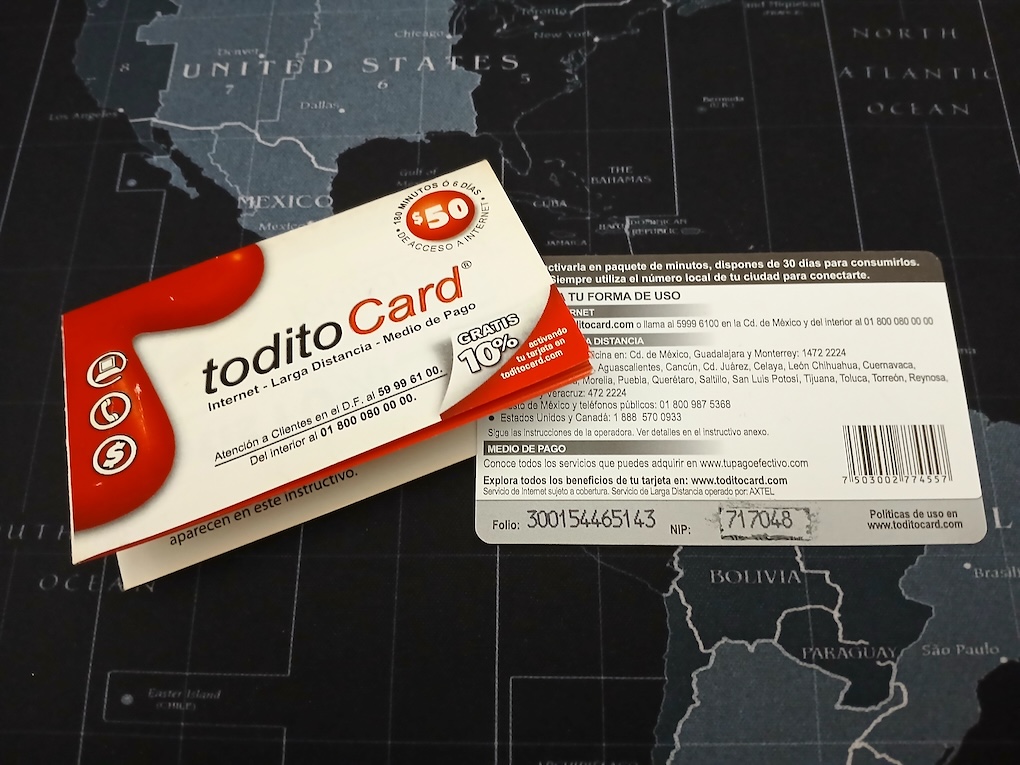
Todito Card para acceso a Internet prepagado por modem. Aproximadamente 2001
El navegador empezó a ser útil para leer los archivos HTML de los discos CD-ROM que comprábamos, y los protocolos de red fueron probados con una caja Linux que yo mismo configuré con un servidor PPP (usando un cable nulo serial). Fue hasta el 24 de junio de 1999 que pude conectarme a Internet por primera vez usando un modem, y la cuenta de un amigo en Prodigy.
Estaba asombrado cuando logré bajar mi primer archivo usando mi propio software. Recuerdo que el radio tocaba Bitter Sweet Symphony.
Ese año 1999, fue la última vez que todo fue tan simple. Los protocolos comenzaron a evolucionar para requerimientos más avanzados, y Javascript acababa de hacer su aparición y se extendía como fuego.
¿Dónde está ese navegador?
¿Dónde iba a encontrar ese browser de 1999? Un gran problema cuando estás desarrollando cosas tan rápido es que no te detienes a hacer respaldos. Como dije antes, encontré algunos discos con una versión temprana del navegador Internet, pero ningún binario.
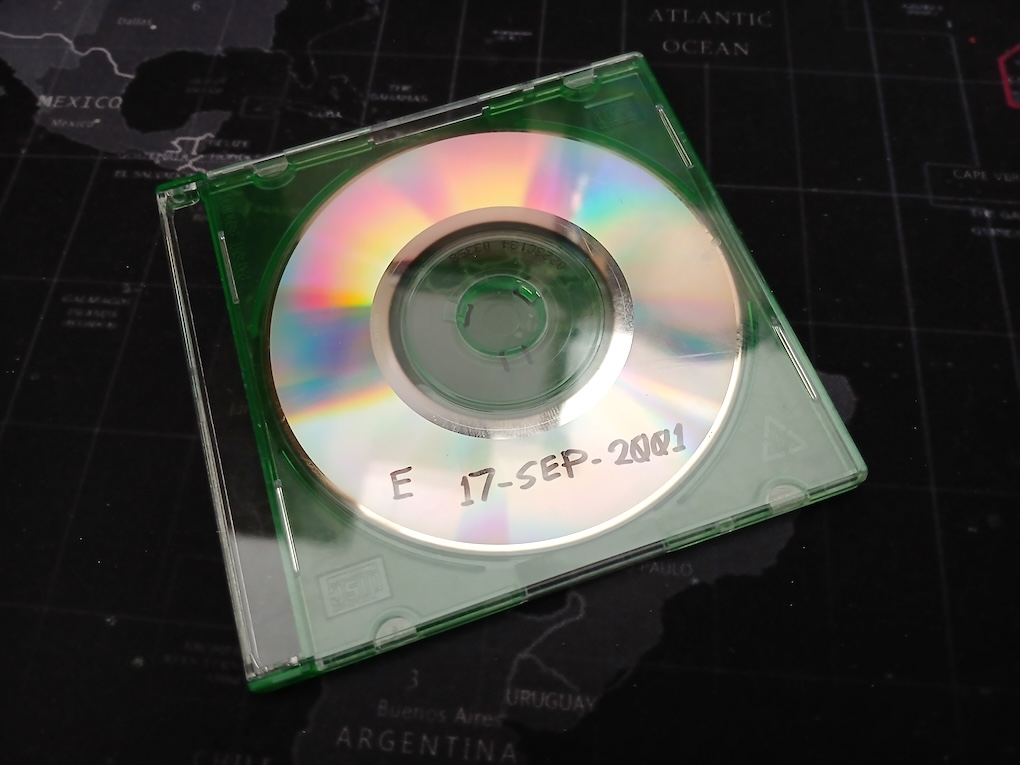
Tuve que buscar en cajas muy viejas, y ahí estaba, una docena de respaldos en CD que hacía una o dos veces al año. Descubrí tristemente que solo dos eran legibles todavía. Uno del año 2001, y otro del 2003. Otro problema, todos estos eran mini-CD, y no podían ser insertados en mi Macbook Pro. Tuve que usar una unidad de CD externa.
Mi tipico Mini-CD de respaldo para 2001.
Ahora la buena suerte, había hecho respaldos dentro del directorio principal de cada proyecto. Así que el navegador Internet tenía un respaldo muy temprano y el mismo de mis discos flexibles (4 de abril de 1999) y el segundo respaldo era el que estaba buscando: 11 de noviembre de 1999. Justo después de mi cumpleaños 21.
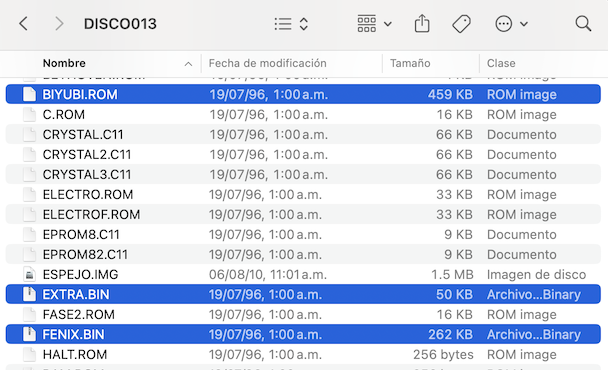
El ejecutable para mi navegador Internet medía 362 kb. ¿Cómo cabía esto en 512 kb. de RAM? Estaba un poco confundido, hasta que descubrí que perdí el tiempo buscando el CD, porque ya tenía el disco flexible con el archivo BIYUBI.ROM y era el mismo disco de donde saqué mi sistema operativo de 1999. Nunca se cargó en RAM, en lugar de eso el programa se quemaba en las EPROM.
Los archivos para crear una ROM de G11V2. Las fechas son incorrectas porque están fijas en el sistema operativo de disco.
Es el disco número 13 de mis respaldos, suena muy apropiado para 1999. ¡Jaja!
La historia fue como esta: La computadora G11V1 fue actualizada a un megabyte de EPROM, y los 512 kb. superiores contenía un sonido de arranque (un fragmento de marimba extraído de un CD), así que removí esto y quemé el navegador de Internet en el mismo espacio, junto con la torre de protocolos TCP/IP.
Esto significa que había encontrado mi propio Santo Grial: Mi primer navegador de Internet funcional que se podía conectar a Internet.
Arranquemos ese navegador
Ahora necesitaba un pequeño programa para arrancar el navegador de Internet. Mi sistema operativo tiene un pequeño código para empezar la primera tarea (la barra con menú de la parte superior):
El primer argumento en lr2 es el nombre de la tarea, el segundo argumento en lr3 es la locación del código, lr4 y lr5 contienen apuntadores al par de pilas requeridas (recuerda que el Am29000 tiene una pila para variables locales, y otra para cosas más grandes), y lr6 y lr7 contienen el tamaño de esas pilas.
Esta función se llama internamente cuando se arranca un archivo ejecutable. Los archivos se hacen ejecutables poniendo un atributo 0x0100, y los bits bajos marca archivo oculto, archivo de solo lectura, y directorio.
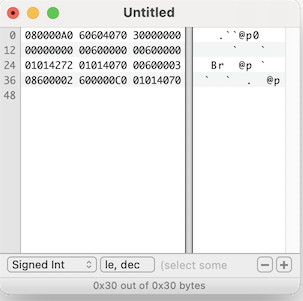
El encabezado ejecutable para iniciar el navegador de Internet luce como esto:
0x00000000: 0xa0000008  JMP *+8
0x00000004: 0x70406060  NOP
0x00000008: 0x00000030  ; Tamaño en bytes del programa.
0x0000000c: 0x00000000  ; Espacio para variables a cero.
0x00000010: 0x00006000  ; Tamaño de la primer pila (24K)
0x00000014: 0x00006000  ; Tamaño de la segunda pila (24K)
0x00000018: 0x72420101  ; Call to OS
0x0000001c: 0x70400101  NOP

0x00000020: 0x03006000  CONST gr96,0x0000	; Comienza el navegador de ROM.
0x00000024: 0x02006008. CONSTH gr96,0x0008
0x00000028: 0xc0000060  JMPI gr96
0x0000002c: 0x70400101  NOP
El hecho de que no hay más código no le afecta al sistema operativo, ya que suelta el control con multitarea cooperativa. La multitarea cooperativa trabajo en un ambiente sin protección, y solo salva el PC actual para retornar después (no le importa que el código del navegador no esté dentro de la tarea original cargada del disco) Así que introduzcamos esto:
Tecleando hexadecimal para crear un ejecutable mínimo para mi SO.
Eran casi las 11pm cuando descubrí que el tamaño mínimo para un programa ejecutable es 64 bytes, y que ese tamaño también debía estar en el encabezado. Alcancé a dar un vistazo antes de que el navegador Internet fallara.
Después de un día entero de depuración, encontré que se las arreglaba para mostrar un mensaje de error antes de fallar. El mensaje era “Protocolo desconocido en dirección” (protocolo desconocido en dirección)
Afortunadamente, tengo el código fuente del navegador de Internet, y pude rastre el primer acceso a la página base. Es un arreglo llamado pagina_base[] y siguiente el código ensamblador, pude ver que esperaba una dirección de RAM absoluta. ¡Lo tengo! Olvidé completamente los datos para el navegador.
¡El área de datos para el navegador estaba sin inicializar! Después de algún desensamblaje pude deducir que comenzaba en 0x80006980 para el navegador, y 0x80002980 para la torre TCP/IP. Esto también significa que hice un programa automático para calcular relocalizaciones en una posición fija del RAM (¿dónde quedó?)
Sin embargo, no iba a ser tan fácil. ¿Recuerdas que usé lenguaje C? Hay datos inicializados que deben ser copiados en RAM precediendo el área que se pone en ceros. Después de tomar esto en cuenta ¡¡Funcionó!! Pero los menúes no aparecían, y después de un pequeño análisis descubrí que la RAM se copiaba en el lugar equivocado. Pensé que era 0x80006980 cuando debía ser 0x80006d80.
Intenté cargar una página y se quedó trabado. ¡Vaya! ¿porqué hice algo tan complicado?
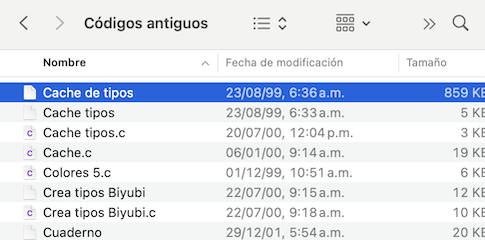
Resulta que el navegador intentaba cargar un cache de fonts bitmapeados, pero no tenía el archivo a mano. Tuve que buscarlo en el respaldo de mini-CD y por suerte hallé el archivo “Cache de tipos” con fecha de 23 de agosto de 1999. Este archivo esta compuesto de tipos de letra en bitmap que obtuve de X/Window, y algunos pregenerados hechos con el rasterizador Type 1. De esta forma las páginas web se ilustraban más rápido en mi sistema de 12 mhz.
El archivo de cache con tipos de letra para mi navegador de Internet.
Una vez que esto estuvo en su lugar (y en el folder correcto), mi navegador de Internet volvió a la vida por primera vez en 27 años. Me salió una lágrima al ver todo esto de nuevo. Fue como volver en el tiempo.
El navegador se llama Biyubi, por una palabra zapoteca que significa "busca sin parar". Esto fue sugerido por mi tío.
Hice algunos cambios posteriores en buildboot.c para poner las fechas exactas de cuando los archivos se respaldaron (¡Congelados en el tiempo!), y crea directorios automáticamente ya que estaba perdiendo mucho tiempo reconstruyendo imágenes de disco duro cuando hallaba un bug. Hay un script build_os.sh que toma todos los archivos del directorio 1999 y reconstruyé la imagen de disco duro.
Estoy muy seguro de que tenía un montón de viejas páginas web que podía incluir, pero no pude encontrarlas, y además puede ser un problema de copyright. Así que... ¿Estás listo? ¿Puede ser posible, tal vez, realizar una última cabalgata con este navegador de Internet?
Conectemos esto a Internet
No hay mucho que se pueda hacer en la Internet moderna con un navegador Internet de 1999. La Internet ha evolucionado en varias iteraciones con nuevos protocolos y estándares.
El navegador se conecta usando mi propia torre de protocolos TCP/IP, pero este software esta atado al uso de un modem para entrar en Internet, y otra pila de protocolos punto a punto (PPP, LCP, PAP, etc.) El código está ahí en la ROM (dirección 0xe0000), y el modem era uno externo conectado por la puerta serial, un US Robotics 33.6k. Me encantaba el diseño agradable de la pequeña caja blanca con la tira de leds, y por supuesto, los ruidos de conexión.
Es bastante más fácil si simplemente parcheo los servicios de red para usar directamente el DNS y una capa de traslación para el protocolo TCP. Eso hice, parchée los servicios de red para apuntar a una tabla de direcciones que a su vez contienen trampas del emulador. Y para mi navegador de Internet, solo necesitaba resolver un nombre de DNS y acceder el protocolo TCP.
Aquí hay una porción del código que trabajé a la medianoche.
case 0x15:  /* resolver (solve DNS name) */
    pc0 = REG_B;
    c = regs[REG_AA(0x82)]; /* Get name */
{
    struct addrinfo hints, *result, *rp;
    int s;
    char hostname[256];
    char *ap;

    ap = hostname;
    while (ap < hostname + 255) {
        *ap++ = read_byte(c);
        c++;
    }
    *ap = '\0';
    /* Returns -1 for non-existent */
    /* Returns host order domain number */

    memset(&hints, 0, sizeof(hints));
    hints.ai_family = AF_INET;  /* ipv4 */
    hints.ai_socktype = SOCK_STREAM;

    s = getaddrinfo(hostname, NULL, &hints, &result);
    if (s != 0) {
        regs[96] = -1;
    } else {
        struct sockaddr_in *ipv4;

        rp = result;
        ipv4 = (struct sockaddr_in *) rp->ai_addr;
        regs[96] = ipv4->sin_addr.s_addr;
    }
    fprintf(stderr, "Solving %s to 0x%08x, returning to 0x%08x\n", hostname, regs[96], regs[REG_AA(0x80)]);
}
    break;
case 0x1b:  /* tcp_abrir */
    pc0 = REG_B;
    c = regs[REG_AA(0x82)]; /* Source port !!! */
    d = regs[REG_AA(0x83)]; /* IP address */
    e = regs[REG_AA(0x84)]; /* Target port */
    {
        int s;
        struct sockaddr_in sserver;

        s = socket(AF_INET, SOCK_STREAM, 0);
        if (s < 0) {
            regs[96] = -1;  /* !!! */
        } else {
            sserver.sin_family = AF_INET;
            sserver.sin_addr.s_addr = d;
            sserver.sin_port = htons(e);
            if (connect(s, (struct sockaddr *) &sserver, sizeof(sserver)) != 0) {
                close(s);
                regs[96] = -1;  /* !!! */
            } else {
                regs[96] = s;
            }
        }
        fprintf(stderr, "tcp_abrir(0x%08x, 0x%08x, 0x%08x), returning 0x%08x\n", c, d, e, regs[96]);
    }
    break;
case 0x1d:  /* tcp_leer */
    pc0 = REG_B;
    c = regs[REG_AA(0x82)]; /* Socket */
    d = regs[REG_AA(0x83)]; /* Address */
    e = regs[REG_AA(0x84)]; /* Bytes */
    {
        int s;
        unsigned char *buffer;

        buffer = malloc(e + 1);
        s = c;
        f = read(s, buffer, e);
        if (f < 0) {
            fprintf(stderr, "errno = %d\n", errno);
            if (errno == EWOULDBLOCK || errno == EINTR)
                f = -33;    /* My OS value for EWOULDBLOCK */
            else
                f = -1;
        } else {
            for (e = 0; e < f; e++) {
                write_byte(d, buffer[e]);
                d++;
            }
        }
    regs[96] = f;
    fprintf(stderr, "tcp_leer(0x%08x, 0x%08x, 0x%08x), returning 0x%08x\n", c, d, e, regs[96]);
    free(buffer);
    }
    break;
Por el momento solo lo implementé para macOS, tal vez después lo haga para Windows Sockets (actualización 20-ago-2026: Ahora también funciona en Windows). Fue muy fácil resolver el nombre de máquina, e hice casi todo bien en el primer paso, pero se cortaba tratando de leer la respuesta HTTP, hasta que descubrí que mi función de vaciado (tcp_vaciar) cerraba el socket porque hice copy&paste de la función de cerrar socket (tcp_cerrar).
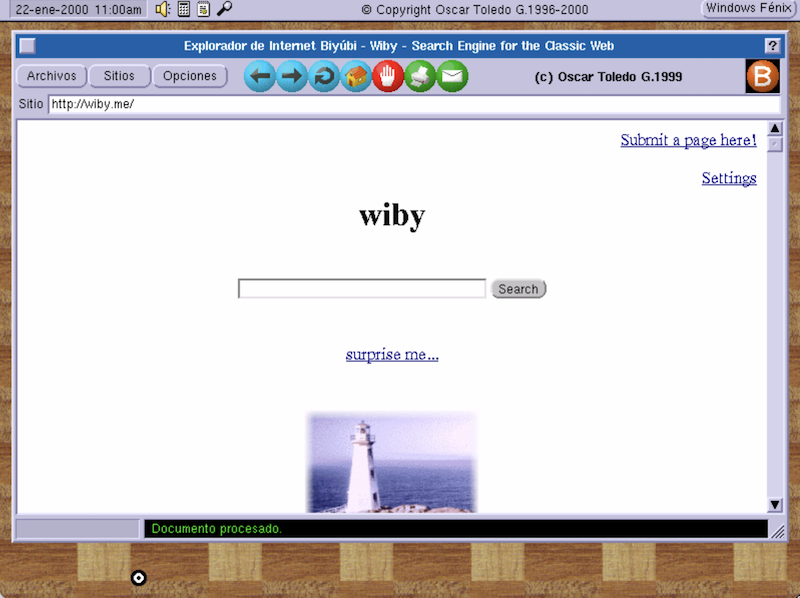
Fue muy emocionante ver mi navegador de Internet acceder de nuevo la red por primera vez en 27 años.
Mi navegador Internet de 1999 visitando wiby.me en 2026
¿Qué tenemos aquí?
Descarga mi emulador Am29000 de Github, ejecútalo, y arrastra y suelta el archivo harddisk_master.img dentro de la ventana (hazlo en el centro de la ventana), también puedes arrastrar otros archivos de imagen para la unidad de disco flexible simulada.
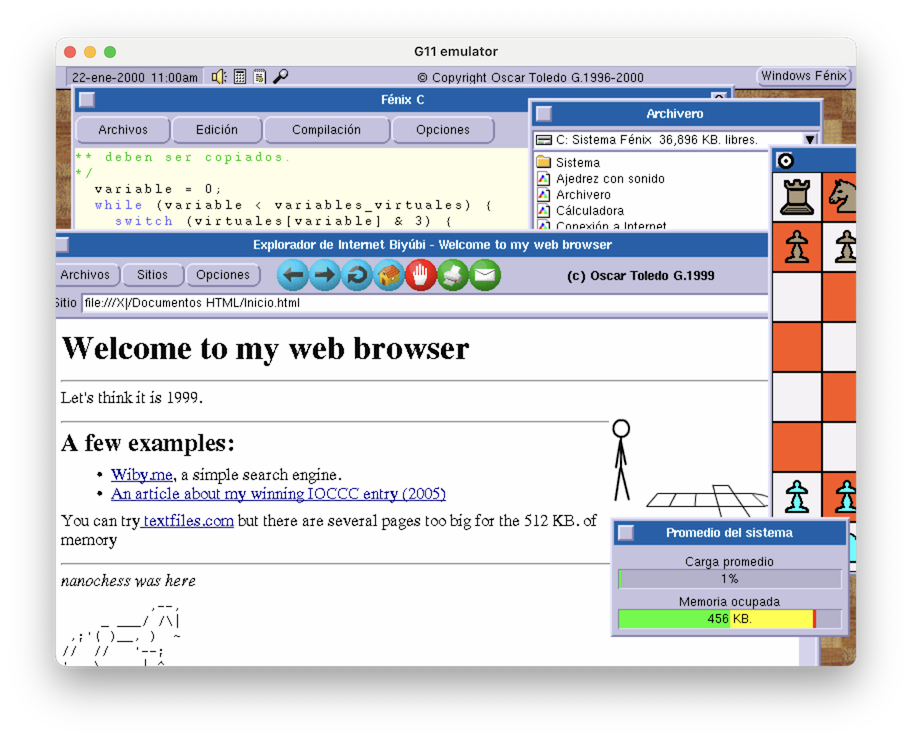
Mi sistema operativo de ventanas (abreviado Windows Fénix, y después Sistema Fénix) en 1999 lucía bastante más moderno. La fecha se muestra en la esquina superior izquierda de la pantalla (click para cambiarla), y hay cuatro iconos fijos: Volumen (no funciona), Cálculadora, Estatus del Sistema, y se cambia la resolución de pantalla (no funciona). En la parte superior derecha de la pantalla hay un botón para ilustrar un menú fijo de programas. Se puede hacer doble click en las barras de título para minimizar ventanas.
Los programas funcionales son Ajedrez, Archivero, Fénix C, Circuito Impreso, Publivisión, y Bloques (hay que compilar del código fuente usando Fénix C)
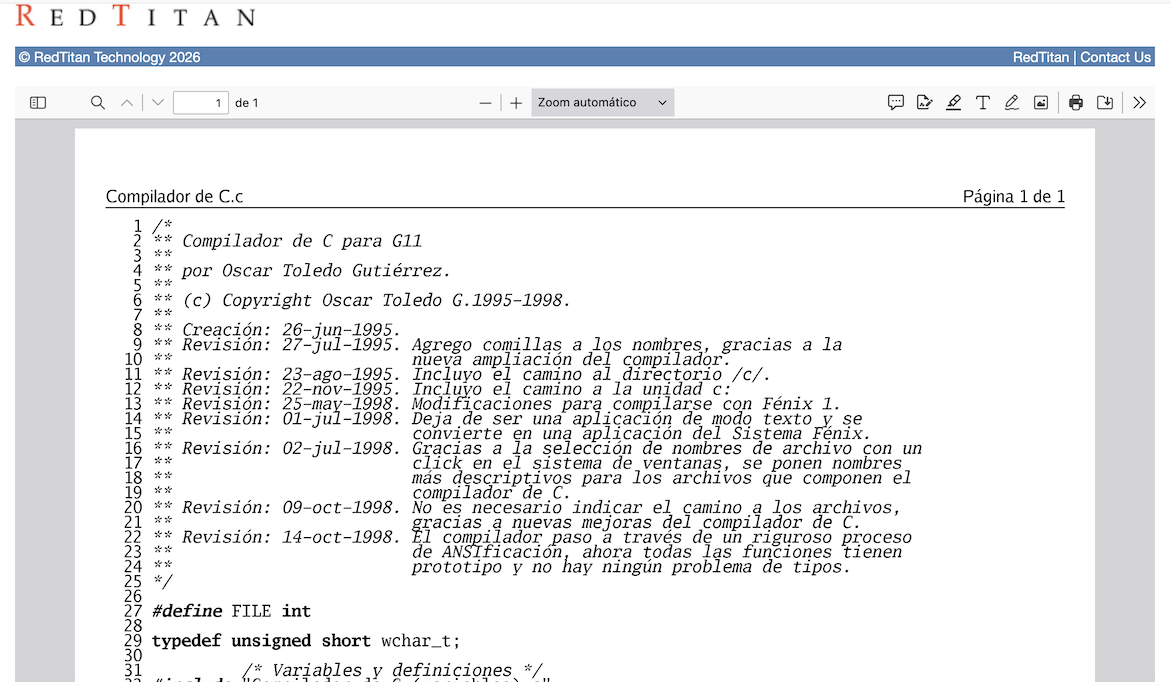
También se puede imprimir código fuente en cualquiera de las impresoras admitidas. Se necesita configurar los fonts para impresión en Fénix C en Opciones-Impresión. Ya puse algunos fonts de libre uso (ubicados en Sistema/Tipos de letra). Por cierto, tuve un crash intentado imprimir hasta que recordé que el sistema requiere que exista el folder Sistema/Temporal para crear archivos temporales.
Para impresoras HP LaserJet IIP se puede ver el archivo generador printer.txt usando redtitan.org. Renombrar con extensión PCL.
Un archivo de código fuente impreso con Fénix C para HP LaserJet IIP.
El código fuente para el compilador de ANSI C y el ensamblador están en el folder Entorno de Desarrollo. ¿Recuerdas que recomendé soltar la imagen de disco duro en el centro de la ventana? Si quieres recompilar el compilador de C o el ensamblador, se necesita memoria extra (desactivando el navegador de Internet), para hacer esto, arrastra y suelta la imagen de disco duro en la esquina inferior derecha de la ventana del emulador (confirma con la utilidad Promedio para ver la memoria libre). Es bastante sorprendente ver como se compilan 10,203 lineas de código fuente y obtener exactamente el mismo binario.
De hecho para compilar de nuevo el binario de mi vieja versión de Publivision (lo hice yo mismo, no hay código en el git, todavía), hay un truco extra: Cerrar la ventana del editor. De otra forma al compilador le falta memoria. Publivisión es casi la primera versión funcional del último día de 1998, así que está lleno de bugs, pero puedes crear documentos e imprimirlos. Esta aplicación temprana aún así anda alrededor de las 10,000 líneas de código fuente.
Circuito Impreso es mi editor de circuitos impresos y es la aplicación más pulida de la época. Es bastante fácil de usar, solo experimenta con click izquierdo (dibujar) y click derecho (seleccionar). La imagen de los creditos fue escaneada de la cubierta de un manual de AMD. Este programa tiene alrededor de 9,000 líneas de código fuente. Hay unos pocos bugs en el controlador de video cuando se mueven objetos, pero lo corregiré después.
Para correr el navegador de Internet, abre el Archivero, y haz click en Explorador de Internet. Aún no me decidía entre Explorador y Navegador (Netscape se enojaba si alguien decía Navigator). También puse el código fuente de mi primer navegador (más como un visor), y no se si se puede compilar, probablemente necesite cambios. Tengo el código fuente para la versión en ROM, pero le falta la librería JPEG adaptada. Consideraré publicarlo incompleto o rehaciendo la librería JPEG. Si recuerdas mi compilador de C todavía no tenía un enlazador, así que modifiqué la librería JPEG para incluirla como archivos individuales. Con tantos archivos ¡Tomaba bastantes minutos compilar de nuevo el navegador!
Otra cosa que puedes notar en el navegador de Internet es que todavía no estoy emulando el procesador Am29050, y la librería JPEG depende mucho de la instrucción de multiplicación, así que es increíblemente lenta para ilustar imágenes JPEG. ¡Es tan 1999!
Postmortem
Tenía una idea de lo que estaba haciendo, pero estaba más dirigido por la emoción del descubrimiento y aprender a hacer las cosas. En retrospectiva, hice algo que se requería en ese tiempo. Un sistema operativo de ventanas, un entorno de desarrollo (editor de texto, compilador de C y ensamblador), un programa de publicación, un editor de circuitos impresos y un navegador de Internet. Una innovación muy adelantada de mi sistema operativo de transputer.
No lo había notado cuando comencé este artículo, pero después de leerlo de nuevo, digo, o sea ¡Codifiqué 50,000 líneas de código fuente en un año!
Comenzaba a ser competitivo, y era debido a que puse mis propias ideas en todo y optimicé mucho las cosas para caber en una máquina pequeña. El siguiente año, 2000, mis programas lucían bastante mejor, los hice estables, y mucho más profesionales. El compilador de C obtuvo un enlazador, así que no necesitaba compilar 10,000 líneas de código fuente para un pequeño cambio. El navegador soportó Javascript, y estaba casi a la par con los navegadores de la época. Tuvimos muchas entrevistas ese año, incluso una en el radio Radioactivo 98.5 que era muy famoso en esa época.
Usamos los chips que teníamos disponibles. El Am29000 ya estaba mostrando su edad, así que nos movimos al procesador Am29050. La computadora G11V3 tenía más memoria, un reloj más rápido, y con cambios de hardware podía manejar la memoria extra disponible en la tarjeta de video PCI. Comencé a implementar CSS en mi navegador de Internet. Pero esa es una historia para otro artículo.
Soy un desarrollador freelance y trabajo muy duro. Escribir estos artículo utiliza mucho de mi tiempo y lo disfruto. Pero sería bastante mejor si me apoyas con los $9 USD sugeridos por mes en Ko-Fi (por seguro que vas a las películas una vez al mes ¡pero estos artículos están mejor que muchas películas!) Apoya a nanochess, obtienes buen karma ¡y te estaré eternamente agradecido! También puedes comprar mis libros en Lulu.com, mis ebooks y juegos en mi tienda digital.